Want more mods for Cities: Skylines II? Explore our entire collection!
On Tap
"Fresh water in, sewage out — for every building, forever."
How do I install On Tap?
Download the free ProjectMods desktop app, then install On Tap for Cities: Skylines II in one click.
</>What does On Tap do?
Stop chasing pipe networks and pumping stations. On Tap keeps your whole city's plumbing sorted — every building gets fresh water and its sewage taken care of, so those water and sewage warning icons never pop up. • Flip on Always Watered and the whole city's water and sewage needs are met, pipes or no pipes. • Skip the water-tower and treatment-plant micromanagement and build the city you actually want. • Perfect for creative and sandbox play, early-game growth, or stress-testing a huge city without utilities holding you back. Leave it off any time you want the real water-management challenge back.
</>What is On Tap?
On Tap keeps your whole Cities: Skylines II city's plumbing sorted, so every building gets fresh water and its sewage handled without those warning icons ever popping up. Skip the pipe-network and treatment-plant micromanagement and build the city you actually want, whether you're growing early game or stress-testing a huge map. Free to download from ProjectMods, the community-first game modding platform. Leave it off any time you want the real water challenge back.
</>Common questions about On Tap
What does On Tap do in Cities: Skylines II?
On Tap keeps your whole Cities: Skylines II city's plumbing sorted, so every building gets fresh water and its sewage taken care of. That means the water and sewage warning icons never pop up, even if you haven't laid a single pipe or built a treatment plant. It's for players who'd rather design a city than chase pumping stations and water towers around the map. You get to skip the utility micromanagement and focus on the fun parts of building. On Tap is free to download from ProjectMods, the community-first game modding platform and desktop app for PC gamers. Leave it off any time you want the real water-management challenge back.
How does the Always Watered toggle work?
Always Watered is the single switch that runs On Tap in Cities: Skylines II. Flip it on and your entire city's water and sewage needs are met, pipes or no pipes, so every building stays supplied and no warning icons appear. There's nothing to configure, so it's just one click to take plumbing off your plate. That's ideal when you want to lay out districts and transit without stopping to route pipe networks first. When you want the challenge back, flip Always Watered off and your city goes right back to needing real water sources, pipes, and treatment to keep everyone supplied and the warnings away.
Does On Tap cover every building, even ones with no pipes connected?
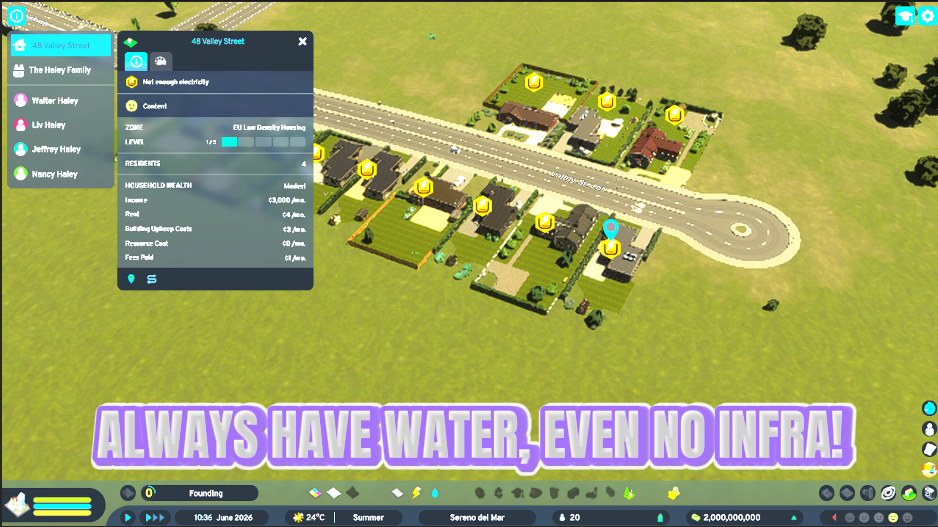
Yes. On Tap keeps every building in your Cities: Skylines II city supplied with fresh water and its sewage handled, whether or not it's hooked up to a pipe network. That's the whole idea: you don't need pumping stations, water towers, or treatment plants for the water and sewage warnings to stay gone. It works the same for a brand-new house on the edge of the map as it does for a dense downtown block. That makes it perfect for rapid expansion, since new zones are covered the instant they're built. Want the plumbing puzzle back? Switch On Tap off and buildings will once again need real pipe connections to stay watered.
Does On Tap change my water bills or utility budget in Cities: Skylines II?
On Tap focuses on keeping every building watered and its sewage handled in Cities: Skylines II, so the water and sewage warnings stay gone even without pipes. Your budget screen keeps working normally, so you can still watch your city's finances while you skip the utility micromanagement. Nothing about your layout is changed, and the mod is fully reversible, so switching On Tap off hands water management straight back to your pipes, pumps, and treatment plants. That makes it a clean way to build a huge city fast, then flip the mod off later and wire up real plumbing if you want the full simulation running on its own.
Why would I use On Tap instead of building a real water network?
On Tap is for when pipes and pumping stations are the thing standing between you and the Cities: Skylines II city you actually want. It's great for creative and sandbox play, for early-game growth when you'd rather expand than plumb, and for stress-testing a huge city without utilities holding you back. Instead of chasing water towers and treatment plants, you keep the whole map supplied with one toggle and focus on the fun parts of building. When you want the real water-management challenge, just leave it off. On Tap is free from ProjectMods, the community-first game modding platform, so trying it out costs you nothing.
What options does On Tap include?
Always Watered
Keeps every building's fresh water and sewage needs met, and clears water/sewage warnings. Turn off to bring the utility challenge back.
On Tap is a ProjectMods mod for Cities: Skylines II that keeps every building supplied with fresh water and its sewage handled, so water and sewage warnings never pop up to slow you down.
What features does On Tap include?
- Flip on Always Watered and every building gets fresh water with its sewage handled, pipes or no pipes
- Wave goodbye to the water and sewage warning icons popping up across your city
- Skip the water-tower and treatment-plant micromanagement and build the city you actually want
- Grow fast in the early game without pausing to lay pipe networks before every new district
- Leave it off any time you want the real water-management challenge back
Best For
- Early-game players who want to sprawl out fast without stopping to plan pumping stations first
- Creative builders shaping a scenic city who don't want pipes dictating where things go
- Anyone stress-testing a huge metro without utilities choking growth before the design is done
- Streamers demoing a city on camera who'd rather talk skyline than chase down a broken pipe