Want more mods for Clone Drone in the Danger Zone? Explore our entire collection!
Size Matters (Editor)
"Tiny robot, giant sword, your call."
/CloneDroneInTheDangerZoneSizeMattersEditor1.png)
How do I install Size Matters (Editor)?
Download the free ProjectMods desktop app, then install Size Matters (Editor) for Clone Drone in the Danger Zone in one click.
</>What does Size Matters (Editor) do?
Ever wanted to be a towering titan stomping through the arena, or a tiny robot that darts between legs? Size Matters hands you the dial. Player Scale grows or shrinks your entire robot, from pint-sized to giant. It keeps your feet planted on the floor the whole time, so you never sink into the ground or float above it after a change. Blade Width fattens up your sword into a proper slab of metal, and Hammer Scale blows your hammer up to comical proportions. Big weapons feel great to swing and make a real statement. Every slider sits at 1 by default, which changes nothing - so you only resize what you actually touch. Drag a slider back to 1, or switch the mod off, and everything snaps back to normal size. Perfect for hilarious screenshots, boss-sized power fantasies, tiny-robot stealth runs, and content that needs a bit of visual chaos.
</>What is Size Matters (Editor)?
Be a towering titan or a tiny robot in Clone Drone in the Danger Zone? Size Matters hands you three sliders. Player Scale grows or shrinks your whole robot while keeping your feet planted, Blade Width fattens your sword, and Hammer Scale blows your hammer up to comical size. Each sits at 1 by default, so you only resize what you touch. From ProjectMods, a community-first modding platform.
</>Common questions about Size Matters (Editor)
What does Size Matters do in Clone Drone in the Danger Zone?
Size Matters lets you resize your robot and your weapons in Clone Drone in the Danger Zone using three sliders. Player Scale grows or shrinks your entire robot, from pint-sized to towering giant, and keeps your feet planted on the floor the whole time so you never sink into the ground or float above it after a change. Blade Width fattens your sword into a proper slab of metal, and Hammer Scale blows your hammer up to comical proportions. Every slider sits at 1 by default, which changes nothing, so you only resize the parts you actually touch.
What do the three Size Matters sliders control?
Each slider handles one thing in Clone Drone in the Danger Zone. Player Scale is your overall size - drag it down to become a tiny robot that darts between legs, or up to tower over the arena as a giant. Blade Width thickens your sword, turning a thin blade into a heavy slab that feels great to swing and makes a real statement. Hammer Scale does the same for your hammer, blowing it up to comical proportions. Because the three are separate, you can mix them freely - a tiny robot swinging an oversized sword, or a giant with a normal-sized weapon - however you want to look.
Does Size Matters keep my feet on the ground when I resize?
Yes - that is a key part of how Size Matters works in Clone Drone in the Danger Zone. When you change Player Scale, the mod keeps your feet planted on the floor throughout, so you never end up sunk halfway into the ground or hovering awkwardly above it after growing or shrinking. That means you can adjust your size mid-arena and keep fighting normally, without your footing breaking. It is what makes both extremes practical rather than glitchy: a giant still stands properly on the arena floor, and a tiny robot still walks the surface instead of clipping through it. Resize freely and your stance stays correct.
What happens if I leave the Size Matters sliders at 1?
Nothing changes. In Clone Drone in the Danger Zone, every Size Matters slider sits at 1 by default, which matches the normal game, so you only resize what you actually adjust. Leave Blade Width and Hammer Scale at 1 and shrink only Player Scale for a pure tiny-robot run, or leave your body normal and blow up just your sword. Drag any slider back to 1, or switch the mod off, and that part snaps straight back to its normal size. This makes it easy to dial in exactly the look you want - one giant feature, or several at once - without touching the rest.
Why would I use Size Matters in Clone Drone?
Size Matters is built for visual chaos and power fantasies in Clone Drone in the Danger Zone. Tower over the arena as a giant, shrink into a tiny robot for a stealthy run, or pair a small body with a comically huge sword for hilarious screenshots. It is a favourite for content that needs a bit of visual punch. It pairs naturally with Robot Summoner and Ghost Mode from ProjectMods when you are staging a scene and want to control both the cast and the camera angle. Set the sliders for the look you want, then drag them back to 1 whenever you are done.
What options does Size Matters (Editor) include?
Player Scale
Grow or shrink your whole robot.
Hammer Scale
Supersize your hammer.
Blade Width
Make your sword blade wider.
Size Matters, a ProjectMods mod for Clone Drone in the Danger Zone, gives you three sliders to grow or shrink your whole robot and blow up your sword and hammer, keeping your feet planted on the floor the whole time.
System Requirements
What features does Size Matters (Editor) include?
- Grow or shrink your whole robot with Player Scale, feet always planted so you never sink or float
- Fatten your sword into a slab of metal with Blade Width for weapons that make a statement
- Blow your hammer up to comical proportions with Hammer Scale for a big, satisfying swing
- Every slider sits at 1 by default, so nothing changes until you drag the one you want
Best For
- Setting up hilarious screenshots with a towering titan robot or a tiny one between everyone's legs
- Living out a boss-sized power fantasy by stomping through the arena at giant scale
- Tiny-robot stealth-style runs where you dart around swinging a comically oversized sword
- Content that needs a bit of visual chaos with mismatched robot and weapon sizes
More Mods for Clone Drone in the Danger Zone
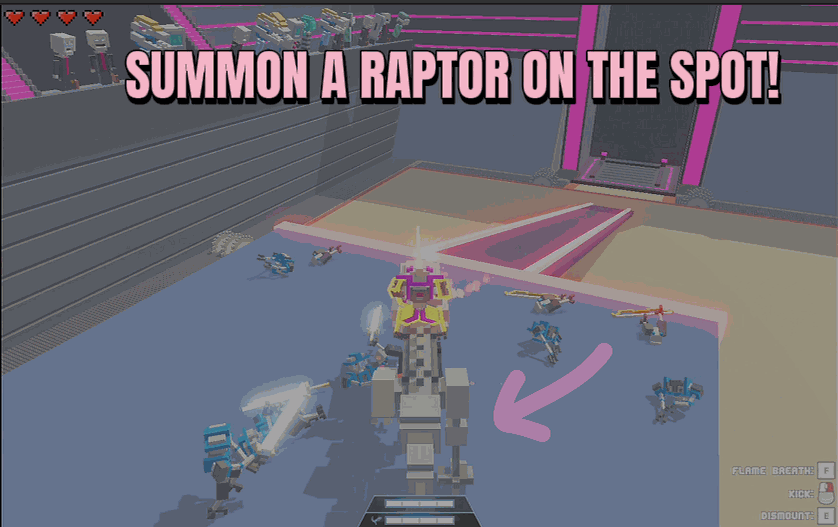
Raptor Rider
Call in a fire raptor and hop straight onto its back. Charge around the arena, trample enemies, and ride in style whenever you want.
/CloneDroneInTheDangerZoneTrophyHeist1.jpg)
Trophy Heist (Unlock All Achievements)
Pop every Steam achievement whenever you want or all of them in one click, or the next locked one at a time.
/CloneDroneInTheDangerZoneTitaniumNoDamage1.png)
Titanium (No Damage)
Turn your robot into an unbreakable titanium frame. Swords, spears, hammers, fire, lasers and lava all leave you standing without a scratch.







