Want more mods for Dumb Ways to Build? Explore our entire collection!
Weather Switch
"Pick the sky. The site will still try to kill you under it."
How do I install Weather Switch?
Download the free ProjectMods desktop app, then install Weather Switch for Dumb Ways to Build in one click.
</>What does Weather Switch do?
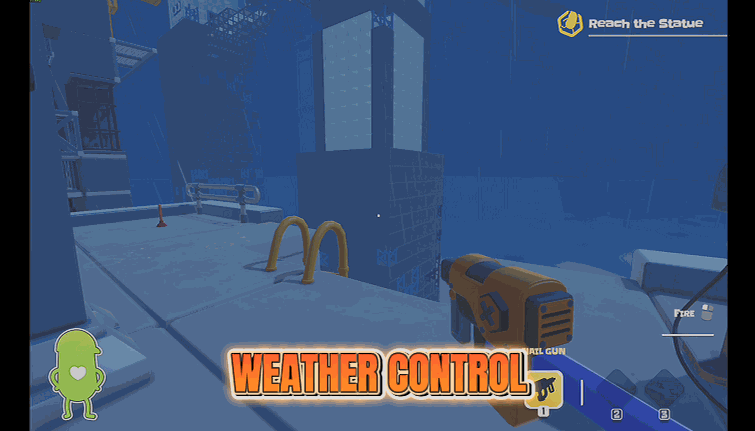
Every area in Dumb Ways to Build has its own weather mood: clear skies, heavy cloud, rain, the odd lightning storm. Weather Switch lets you pick which one you get. Press Refresh Weather to load the game's profiles, choose the one you fancy, set how many seconds the change should take, and press Apply Weather. Set Blend Seconds to zero for an instant cut, or give it a few seconds for a cinematic roll-in. Great for screenshots, for filming the crew's masterpiece under dramatic clouds, or simply because the sewer looked better in the rain. The change is on your own screen, so it never argues with your crewmates' game. Walking into a new zone brings the site's normal weather back until you apply again.
</>What is Weather Switch?
Every area in Dumb Ways to Build has its own weather mood, from clear skies to lightning storms. Weather Switch lets you choose: refresh the game's profiles inside a job, pick one, set how many seconds the change takes, and apply it, on your own screen only. Made for screenshots and dramatic filming. On ProjectMods, the community-first PC mod manager for 400+ games.
</>Common questions about Weather Switch
What does Weather Switch do in Dumb Ways to Build?
Weather Switch lets you pick the weather over any site in Dumb Ways to Build. Every area in the game has its own mood, clear skies, heavy cloud, rain, the odd lightning storm, and normally you get whatever the site was built with. With the mod, press Refresh Weather inside a job to load the profiles the game has ready, choose the one you fancy from the Weather dropdown, set Blend Seconds for how long the change should take, and press Apply Weather. Zero blends instantly; a few seconds gives you a cinematic roll-in. The change happens on your own screen only, so it never argues with your crewmates' game, and walking into a new zone brings the site's normal weather back until you apply again.
Why is the Weather dropdown empty until I press Refresh Weather?
Because Weather Switch loads the list from the Dumb Ways to Build job you are standing in, and the game only has its weather ready once you are inside a site, not on the main menu. Load into a site, press Refresh Weather, and the dropdown fills with every weather profile the game has ready, which can include moods that belong to other areas. Since the list comes straight from the game, any weather the developers add in an update shows up on your next refresh without waiting for the mod to change. If you have applied a profile and then walked into a new zone, the site's normal weather comes back on its own; the dropdown should still hold your last choice, so pressing Apply Weather again brings it back without another refresh.
Does Weather Switch change the weather for my crewmates too?
No, only on your own screen. Weather Switch changes the sky in your copy of Dumb Ways to Build and leaves your crewmates' game exactly as it was, so you can film the bridge under a lightning storm while the friend next to you is building in sunshine. That is deliberate: weather is atmosphere rather than a rule of the job, so there is nothing to sync and nothing for the host to approve, and a guest can use the mod freely in any lobby. It also means the hazards on site do not change with the sky; a rainy sewer is still the same sewer, just moodier. If the whole crew wants the same storm for a group screenshot, each player applies the same profile in their own ProjectMods launcher.
What does Blend Seconds do?
Blend Seconds controls how long the change takes when you press Apply Weather in Weather Switch. Set it to zero and the Dumb Ways to Build sky cuts instantly to the new profile, which is what you want when you are just trying options to see which one suits the site. Give it a few seconds and the old weather rolls into the new one gradually: clouds gather, the light shifts, the rain fades in. That slow version is the one for filming, because a storm creeping over the skyscraper while the crew argues about a beam looks a lot better than a hard cut. There is no wrong number; short blends feel snappy, long blends feel cinematic, and you can apply again with a different value at any time.
Why did the weather go back to normal when I moved to a different area?
Because each area in Dumb Ways to Build carries its own weather, and walking into a new zone loads that zone's mood over whatever Weather Switch applied. The mod changes the sky you are under right now rather than rewriting every area on the site, so the moment you cross into a new zone the game's normal weather for that zone comes back. It is not a bug, and nothing needs resetting; press Apply Weather again once you are in the new area and your chosen profile returns, with the same Blend Seconds you set. For a long filming session that moves around a site, the practical habit is to bind Apply Weather to a key and simply re-apply as you go. Refresh Weather is only needed if the dropdown looks empty.
What options does Weather Switch include?
Blend Seconds
How many seconds the change takes. Zero switches instantly.
Apply Weather
Switches the sky to the chosen profile.
Weather
Which weather profile to use. Press Refresh Weather after you are on a site that has weather zones (lobby and elevator have none).
Refresh Weather
Loads weather profiles from the site you are on. Empty list means this area has no weather system yet.
Weather Switch is a ProjectMods mod for Dumb Ways to Build that lets you pick which of the game's weather profiles plays over the site you are on, with a Blend Seconds setting for an instant cut or a slow roll-in.
System Requirements
What features does Weather Switch include?
- Picks any weather profile the game has ready, from clear skies to heavy cloud, rain and a lightning storm.
- Blends the change over as many seconds as you set, or cuts to the new sky instantly at zero.
- Loads the profile list from inside a job with Refresh Weather, so it matches whatever the game currently ships.
- Changes the sky on your screen only, so it never argues with what your crewmates are seeing.
- Hands the site its normal weather back when you walk into a new zone, until you apply your pick again.
Best For
- Screenshot hunters who want the finished hotel under dramatic storm clouds instead of the flat midday sky the site handed them.
- Content creators filming the crew's masterpiece who want a slow ten-second roll-in from clear skies to lightning for the reveal.
- Players who just think the sewer looks better in the rain and want it that way every time they drop in.
- Anyone who finds a site's default weather too gloomy to build under and would rather swap in clear skies on their own screen.
- Streamers who want to change the mood on cue for chat without changing anything for the crewmates in the lobby.
More Mods for Dumb Ways to Build
/DumbWaysToBuildBottomlessToolbelt1.png)
Bottomless Toolbelt (Endless Tool Uses)
Your tools never run out of uses: nail gun, spray can, banana gun and the rest keep firing, and your emergency balloon never loses air.
/DumbWaysToBuildIronLungs1.png)
Iron Lungs (Endless Stamina)
Stamina never drains, so you can sprint forever and carry the heaviest beam without your bean giving up.
/DumbWaysToBuildFullyCertified1.png)
Fully Certified (Every Certification)
Unlocks every certification in one press, which also hands you the cosmetics and emotes they gate and pops the matching Steam achievements.







