Want more mods for Green Hell? Explore our entire collection!
Jungle Time Editor
"Skip to sunrise or fast-forward a week - the jungle clock is yours."
How do I install Jungle Time Editor?
Download the free ProjectMods desktop app, then install Jungle Time Editor for Green Hell in one click.
</>What does Jungle Time Editor do?
Green Hell has its own relentless rhythm - the sun climbs, the rain rolls in, and night drops fast and dark. Jungle Time Editor hands that rhythm to you. Dial in any hour on a simple 24-hour clock and jump straight there. Line up a golden sunrise for the perfect screenshot, chase away a pitch-black night so you can actually see the trail, or fast-forward past the small hours to get back to daylight and daylight tasks. Want to skip ahead? Set the day, month and year and leap forward as far as you like - handy for waiting out a wound, a hunger streak, or just to see how your camp looks a week later. Everything you set takes hold the moment you hit Set Time, and Get Current Time pops up exactly where the clock stands right now so you always know before you change a thing. Whether you're a builder chasing the best light, a screenshotter framing the perfect shot, or a survivor who's just done with the dark, the hours of the jungle are yours to set.
</>What is Jungle Time Editor?
Jungle Time Editor hands Green Hell's day-night cycle to you. Dial in any hour on a 24-hour clock and jump there for a golden sunrise, a clear night, or daylight past the small hours. Set the day, month, and year to leap forward as far as you like, and Get Current Time shows where the clock stands first. Free from ProjectMods, the community-first game modding platform for PC gamers.
</>Common questions about Jungle Time Editor
What does Jungle Time Editor do in Green Hell?
Jungle Time Editor from ProjectMods hands Green Hell's clock and calendar to you. The jungle normally runs on its own relentless rhythm — the sun climbs, rain rolls in, and night drops fast and dark. With this mod you dial in any hour on a simple 24-hour clock and jump straight there, or set the day, month, and year to leap forward as far as you like. Hit Set Time and the world snaps to the moment you picked — a golden sunrise, a moonlit night, or a whole new day. Get Current Time shows exactly where the clock stands before you change anything. Free in the ProjectMods desktop app, the community-first modding platform for PC gamers.
How do I change the time of day in Green Hell with Jungle Time Editor?
Dial the hour you want on the 24-hour clock and hit Set Time — the jungle jumps straight to it. Want a golden sunrise for the perfect screenshot? Set it to early morning. Sick of stumbling through a pitch-black night with no torch? Push the clock to daylight and carry on. Fast-forward past the small hours to get back to daytime tasks, or drop into dusk for the mood you're after. Everything takes hold the instant you press Set Time, so there's no waiting around for the sun to move on its own. It's the quickest way to get the exact lighting you want in Green Hell without sleeping or camping through the hours.
Can I skip ahead multiple days or a whole week in Green Hell?
Yes. Beyond the hour, Jungle Time Editor lets you set the day, month, and year, so you can leap forward as far as you like — a single day or a whole week and beyond. It's handy for waiting out a wound or a rough hunger streak without babysitting the clock, or for jumping ahead just to see how your camp and surroundings look days later. Set the calendar values, hit Set Time, and Green Hell advances to that point. Because you're choosing the exact date, you're never stuck idling through real minutes to pass in-game time. Pair it with an hour setting to land on, say, sunrise a week from now in one move.
What does the Get Current Time button do in Jungle Time Editor?
Get Current Time reads back exactly where Green Hell's clock and calendar stand right now — the hour, day, month, and year — and shows it to you before you change a thing. It's the check-first step: pop it open to see the current in-game time, decide how far you want to jump, then enter your new values and hit Set Time. That way you're never guessing whether it's morning or midnight, or how many days into your run you actually are. It's especially useful on a save you haven't touched in a while, when you've lost track of where the jungle's timeline sits. Think of it as the readout that pairs with Set Time's control.
Why would I use Jungle Time Editor in Green Hell?
Because the jungle's relentless day-night cycle doesn't always match what you want to do. Builders use Jungle Time Editor to chase the best light for a base tour, screenshotters set a golden sunrise or moonlit night to frame the perfect shot, and survivors who are just done with the dark push straight through to daylight. It's also a quiet time-saver: skip ahead to heal a wound, ride out a hunger streak, or see how your camp looks a week later without idling through real minutes. Content creators lean on it to stage consistent lighting across a video, too. Whatever your reason, the hours of Green Hell become yours to set. Free in the community-first ProjectMods desktop app for PC modding.
What options does Jungle Time Editor include?
Month
The month of the year, 1 to 12. Set it, then hit Set Time.
Year
The year to jump to, 1 to 99. Set it, then hit Set Time.
Get Current Time
Check the clock. Pops up the current day, time, month and year so you know exactly where you stand before changing anything.
Hour
The hour on a 24-hour clock, from 0 (midnight) through 12 (midday) to 23 (late night). Set it, then hit Set Time.
Set Time
Jump the jungle straight to the Day, Hour, Month and Year you picked above.
Day
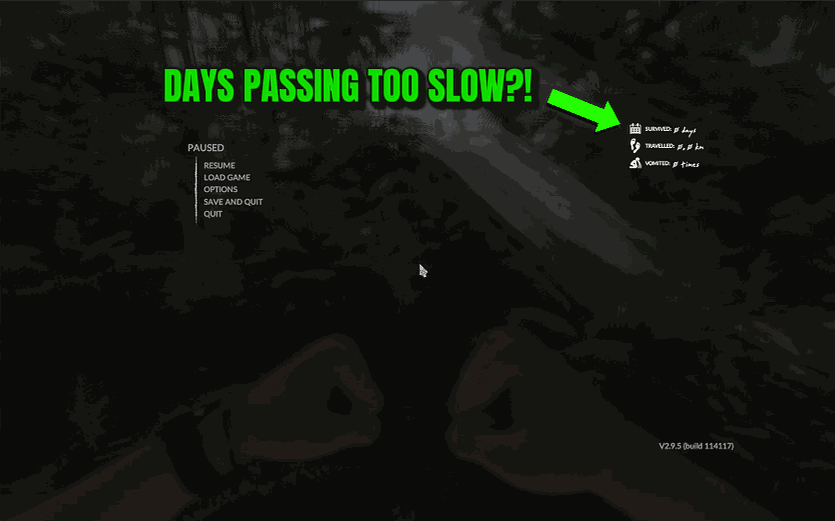
How many days you've survived. Set this and the day count in your pause menu jumps straight to it.
Jungle Time Editor is a ProjectMods mod that puts Green Hell's clock and calendar under your control — pick any hour, day, month, and year, hit Set Time, and the jungle jumps to a fresh sunrise, a moonlit night, or a whole new day.
System Requirements
What features does Jungle Time Editor include?
- Dial any hour on a simple 24-hour clock and the jungle jumps straight to it - sunrise, high noon, or midnight
- Set the day, month, and year to leap forward as far as you like and see how your camp looks later
- Hit Set Time and the new hour takes hold instantly - fresh light, a different sky, whatever you picked
- Check where the clock stands first with Get Current Time so you always know before you change a thing
- Chase away a pitch-black night in one tap so you can actually see the trail again
Best For
- Screenshotters lining up a golden sunrise or a moonlit canopy for the perfect framed shot
- Builders who want good working light on their camp instead of fumbling through a dark jungle night
- Waiting out a nasty wound or a rough hunger streak by skipping the calendar forward a few days
- Survivors just done with the dark who want daylight back so they can get on with jungle tasks
- Creators filming a day-to-night sequence who need the sky sitting at an exact hour on cue
More Mods for Green Hell

One-Punch Predator (Instant Takedowns)
Every hit you land drops the target instantly - jaguars, natives, snakes, and boars all go down in one blow, whether you swing a weapon or throw a bare punch.
/GreenHellSurgeonHandsStableAim1.jpg)
Surgeon Hands (Stable Aim)
Kills the camera and aim shake in Green Hell so your view stays dead still and your bow and spear throws land right where you point.
/GreenHellJungleTrophyAchievements1.png)
Jungle Trophy (Achievements)
Pop any or every Steam achievement in Green Hell instantly — no grinding through the rainforest required.







