Want more mods for Potion Craft: Alchemist Simulator? Explore our entire collection!
Trophy Shelf
"The whole trophy wall, filled in one press."
How do I install Trophy Shelf?
Download the free ProjectMods desktop app, then install Trophy Shelf for Potion Craft: Alchemist Simulator in one click.
</>What does Trophy Shelf do?
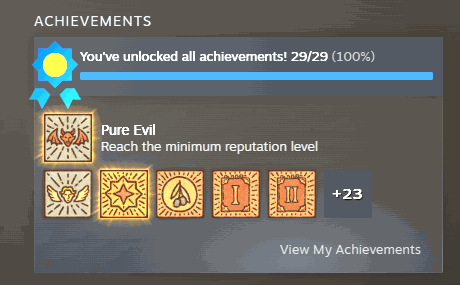
Chasing every last Potion Craft achievement can mean hours of very specific brewing. Trophy Shelf lets you fill the whole wall on your terms. Unlock a single achievement you have been stuck on, or clear the entire list in one press — each one lights up in-game and on your Steam profile. Want a clean slate again? Lock them all back up just as easily.
</>What is Trophy Shelf?
Trophy Shelf lets you fill the whole achievement wall in Potion Craft on your terms: unlock a single one you are stuck on, clear the entire list in one press, or lock them all back up for a clean slate. Each lights up in-game and on Steam. A free-tier Potion Craft mod from ProjectMods, the community-first PC mod manager.
</>Common questions about Trophy Shelf
What does Trophy Shelf do in Potion Craft?
Trophy Shelf lets you fill the Potion Craft achievement wall however you like. Chasing every last achievement can mean hours of very specific brewing, so this mod hands the choice back to you. Unlock a single achievement you have been stuck on, or clear the entire list in one press, and each one lights up both in-game and on your Steam profile. Changed your mind? You can lock them all back up just as easily for a clean slate.
How do I unlock just one specific achievement?
Trophy Shelf lets you target a single achievement in Potion Craft. First press Refresh List to load every achievement into the Select Achievement dropdown, then pick the one you want and press Unlock Specified Achievement. Only that achievement unlocks, lighting up in-game and on Steam. This is ideal when one stubborn achievement is all that stands between you and a full set, and you would rather not clear the whole list at once. The rest of your progress stays exactly as it was.
What do Unlock All and Lock All Achievements do?
Unlock All Achievements clears the entire Potion Craft list in a single press, lighting every trophy up in-game and on your Steam profile at once. Lock All Achievements is its reverse: it resets every achievement back to locked, giving you a clean slate. Together they let you fill the whole wall instantly or wipe it clean whenever you want. Trophy Shelf makes both directions equally quick, so you are never stuck with a state you did not choose.
Why is the achievement dropdown empty when I first load in?
The Select Achievement dropdown in Trophy Shelf starts empty until it reads the game's achievement data, so you need to press Refresh List once you are in-game in Potion Craft. That fills the dropdown with the full list, ready to pick from. If the menu looks blank, that is expected rather than a fault; a quick Refresh List sorts it. Doing this in-game rather than at the menu ensures the mod can see every achievement the game offers before you choose one.
Do unlocked achievements show up on my Steam profile?
Yes. When Trophy Shelf unlocks an achievement in Potion Craft, it lights up both in-game and on your Steam profile, just as it would if you had earned it through play. The same goes for clearing the whole list with Unlock All Achievements. If you later use Lock All Achievements, they reset back to locked. This makes it easy to complete your trophy wall on your own terms. It is a free-tier mod from ProjectMods, the community-first PC mod manager.
What options does Trophy Shelf include?
Unlock Specified Achievement
Unlock just the achievement you picked above.
Refresh List
Load the full list of achievements into the dropdown. Do this in-game.
Select Achievement
Pick which achievement to unlock. Press Refresh List first to fill this in.
Lock All Achievements
Reset every achievement back to locked.
Unlock All Achievements
Unlock every achievement in the game at once.
Trophy Shelf is a free ProjectMods mod for Potion Craft that unlocks any achievement or every achievement at once, showing up both in-game and on your Steam profile.
System Requirements
What features does Trophy Shelf include?
- Pick one specific achievement from the list and unlock just that one
- Fill the entire achievement wall in a single press when you want the lot
- Watch each one light up both in-game and on your Steam profile
- Lock everything back to a clean slate whenever you change your mind
Best For
- You're stuck on one very fiddly achievement and want to tick it off without the hassle
- Completionist who wants a full achievement wall without hours of oddly specific brewing
- You reset a save and want your hard-earned achievements showing on your profile again
- You fancy a clean slate to chase the whole list over again the honest way
More Mods for Potion Craft: Alchemist Simulator
Master Alchemist's Library
Unlock all the potion bases and every legendary recipe, then bolt extra pages onto your recipe book so you never run out of room.
Green Thumb
Skip the wait between days - every plant in your garden springs to full growth the moment you press the button.
Well-Stocked Shelf
Hand yourself a stack of any ingredient, one of everything, or a full set of salts. Experiment freely without a single trip to the trader.



























































































































































































