Want more mods for Clone Drone in the Danger Zone? Explore our entire collection!
Titanium (No Damage)
"Every blade bounces off. You just keep fighting."
/CloneDroneInTheDangerZoneTitaniumNoDamage1.png)
How do I install Titanium (No Damage)?
Download the free ProjectMods desktop app, then install Titanium (No Damage) for Clone Drone in the Danger Zone in one click.
</>What does Titanium (No Damage) do?
Some runs you just want to enjoy the chaos without watching your robot get sliced in half. Flip on No Damage and nothing lands. Sword swings glance off, spears can't pierce you, hammers don't dent you, flames don't melt you, and even a lake of lava is just warm scenery. You stay in one piece no matter what the arena throws at you, so you can practice tricky sword duels, push deep into endless runs, mess around with every weapon, or just steamroll story mode stress-free. Enemies still take full damage from you, so you're the unstoppable one, not them. Want the challenge back? Switch it off and your robot is mortal again, exactly like normal.
</>What is Titanium (No Damage)?
Some runs you just want the chaos, not the fragility. Turn on Titanium in Clone Drone in the Danger Zone and nothing lands - swords glance off, spears can't pierce you, hammers don't dent you, flames don't melt you, and a lake of lava is just warm scenery. Enemies still take full damage from you, so you stay the unstoppable one. From ProjectMods, a community-first modding platform.
</>Common questions about Titanium (No Damage)
What does Titanium do in Clone Drone in the Danger Zone?
Titanium turns your robot into an unbreakable frame in Clone Drone in the Danger Zone. Turn on No Damage and nothing the arena throws at you lands: sword swings glance off, spears cannot pierce you, hammers do not dent you, flames do not melt you, and even a lake of lava becomes just warm scenery. You stay in one piece no matter what, so you can enjoy the chaos without watching your robot get sliced in half. Enemies still take full damage from you, so you are the unstoppable one, not them - and you can switch it off any time to become mortal again.
What kinds of damage does Titanium block?
Titanium blocks all of it in Clone Drone in the Danger Zone. Melee weapons like swords, spears and hammers glance off without hurting you, ranged threats like arrows and energy lasers fail to land, and environmental dangers are covered too - fire does not melt you, and even standing in a lake of lava does nothing but glow. That total coverage is the point: you do not have to watch for any particular attack type, because none of them can break your robot. Whether it is a boss's heavy swing or a stray flame in the arena, Titanium keeps you standing without a scratch.
Do enemies still take damage while Titanium is on?
Yes. Titanium only protects you in Clone Drone in the Danger Zone - enemies still take full damage from everything you do. Your swings, blasts and environmental tricks all work on them exactly as normal, so a fight becomes completely one-sided in your favour: you can carve through a whole arena while nothing they do lands on you. That is what makes it feel like a power fantasy rather than a stalemate. You remain the unstoppable one, dealing damage freely while shrugging off every counterattack, which is ideal for pushing deep into runs or just enjoying the carnage without any real risk.
Is Titanium a simple on/off toggle?
Yes - Titanium is a single No Damage switch in the ProjectMods options panel for Clone Drone in the Danger Zone. Flip it on and your robot becomes invulnerable to everything; flip it off and you are mortal again, exactly like the normal game. There are no settings to balance, so you can turn it on for a stress-free run and off the moment you want the challenge back. Because it is instant and reversible, it is easy to use it selectively - unbreakable while you learn a brutal boss, then mortal again once you are ready to earn the win for real.
Why would I use Titanium in Clone Drone?
Titanium is for enjoying Clone Drone in the Danger Zone without the run ending on you. Practise tricky sword duels without dying to a mistake, push deep into endless runs, mess around with every weapon, or steamroll story mode stress-free. It is the go-to when you want the chaos but not the fragility. It pairs naturally with Iron Stance and Unlimited Energy from ProjectMods so you stay unbreakable, always on your feet, and never out of fuel at once. Keep it on for a worry-free session, or switch it off whenever you want your robot mortal and the challenge back.
What options does Titanium (No Damage) include?
No Damage
Turn your robot into an unbreakable titanium frame — no attack can slice, stab, burn, or blow you apart.
In Clone Drone in the Danger Zone, Titanium from ProjectMods makes your robot unbreakable - swords, spears, hammers, fire, lasers and even lava can't hurt you, while enemies still take full damage from you.
System Requirements
What features does Titanium (No Damage) include?
- Turn on No Damage and nothing lands - sword swings glance off and spears can't pierce you
- Shrug off hammers, flames, lasers, and even a lake of lava as if it were warm scenery
- Enemies still take full damage from you, so you are the unstoppable one, not them
- Switch it off any time and your robot is mortal again, exactly like the normal game
Best For
- Practising tricky sword duels without watching your robot get sliced in half every attempt
- Pushing deep into an endless run to see the later waves stress-free
- Messing around with every weapon and hazard when you just want the chaos, not the risk
- Steamrolling story mode on a relaxed run where survival isn't the point
More Mods for Clone Drone in the Danger Zone
/CloneDroneInTheDangerZoneBrainFreezeDisableEnemyAI1.png)
Brain Freeze (Disable Enemy AI)
Shut down enemy brains so they stand there harmlessly, or just pin their feet in place while they keep flailing.
/CloneDroneInTheDangerZoneArsenalWeaponAbilityGiver1.png)
Arsenal (Weapon Ability Giver)
Hand yourself any weapon or ability on demand - sword, bow, hammer, EMP hammer, fire grenades, flame breath, energy laser, full armour, or the kick - the moment you want it.
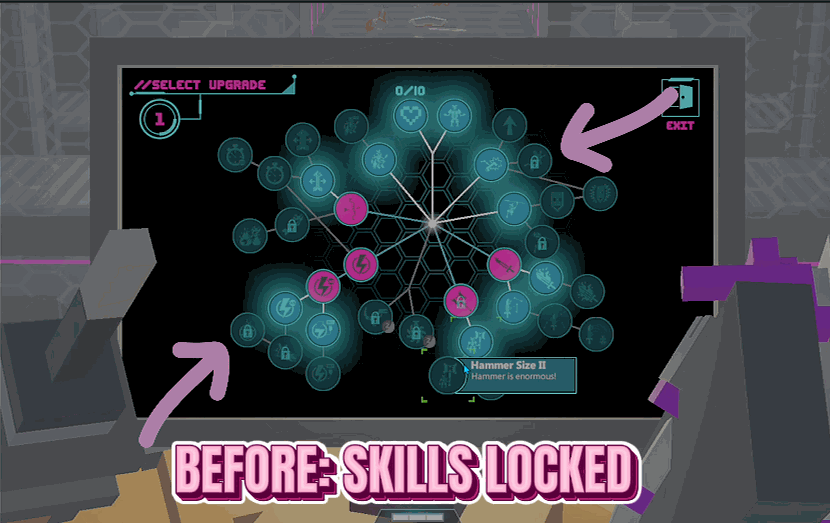
Skill Unlocker (Master Key)
Opens up every upgrade on the skill screen so you can pick anything, without waiting on challenges or long-term progress to unlock it.







