Want more mods for Farm Together 2? Explore our entire collection!
Sky Farmer
"Lift off and glide over your whole farm, straight through fences and walls."

How do I install Sky Farmer?
Download the free ProjectMods desktop app, then install Sky Farmer for Farm Together 2 in one click.
</>What does Sky Farmer do?
Ever wished you could just leave the ground and float over your entire farm? Sky Farmer makes it happen. Switch on Fly Mode and your farmer lifts straight into the air. Use your normal movement keys to cruise in any direction, rise up, or drop back down, all at a speed you set yourself. Fences, walls, and buildings stop getting in your way, so you can glide clean across the map to wherever you want to be. Great for scouting a huge farm, lining up the perfect screenshot, or just having fun buzzing around from above. Flip Fly Mode back off any time to drop gently back to normal. Works best in single-player.
</>What is Sky Farmer?
Ever wanted to leave the ground and float over the whole farm? Sky Farmer's Fly Mode lifts your Farm Together 2 farmer into the air, and your normal movement keys cruise you in any direction at a Fly Speed you choose. Fences, walls, and buildings stop getting in the way — great for scouting or the perfect shot. Part of the Farm Together 2 lineup in ProjectMods, the community-first PC mod manager.
</>Common questions about Sky Farmer
What does Sky Farmer do in Farm Together 2?
Sky Farmer lets your farmer leave the ground and fly over your Farm Together 2 farm. Switch on Fly Mode and you lift straight into the air; your normal movement keys then cruise you in any direction, rise you higher, or drop you back down, all at a speed you set yourself. Fences, walls, and buildings stop getting in your way, so you can glide clean across the map to wherever you want to be instead of walking the long way round. Flip Fly Mode off any time and you settle gently back to normal. Sky Farmer is one of the Farm Together 2 mods in ProjectMods, the community-first PC mod manager and desktop app for 400+ games.
How do I steer while Fly Mode is on?
The same keys you already use. Sky Farmer doesn't hand you a separate flight control scheme to learn — once Fly Mode is on in Farm Together 2, your normal movement keys move you through the air instead of across the ground, and you have vertical control on top so you can climb or descend. It's designed to feel like your farmer just started drifting rather than like you switched into a different game. That means you can go from walking a field to floating over it and back again without changing how you play. The only new number to think about is Fly Speed, which decides how quickly you travel while you're up there.
What happens if I switch Fly Mode off while I'm high above the farm?
You settle back down gently rather than dropping like a stone. Switching Fly Mode off in Farm Together 2 while you're high above the farm returns your farmer to normal ground movement — it's designed as a comfortable off-switch you can hit any time, not a trapdoor. That means you can fly out to the far corner of your farm, drop the toggle, and get straight back to planting where you landed. The same applies to the fences and buildings you passed through on the way: they're solid again the moment you're back on the ground, exactly as they always were. Nothing about your farm is changed by having flown over it.
What should I set Fly Speed to?
Fly Speed decides how fast you travel while Fly Mode is on, and the right number depends entirely on why you're up there. Low speeds give you gentle, precise drifting — that's what you want when you're nudging into position for a screenshot or floating slowly along a row of buildings to look at them properly. High speeds turn Sky Farmer into transport: a huge Farm Together 2 farm goes by in seconds and you land where you meant to go. Plenty of players set it low for photo work and crank it when they just need to be somewhere. You can change it whenever you like, including mid-flight.
Why fly over the farm instead of just walking it?
Because your farm looks better from up there, and because walking around it takes forever. Sky Farmer is at its best for two jobs, maybe three. First, scouting: a big Farm Together 2 farm is hard to take in from ground level, and floating above it shows you the whole layout at once — where the gaps are, whether that path lines up, what the place actually looks like as a design. Second, photography: pair Fly Mode with Clean View, which hides the entire heads-up display, and you can drift to any angle with a completely clear screen. Third, and let's be honest, it's just good fun buzzing around your own farm from above.
What options does Sky Farmer include?
Fly Speed
How fast you move while flying. Lower for gentle, precise drifting; higher to zip across a big farm in seconds.
Fly Mode
Turn this on to lift off and fly around your farm, drifting straight through fences, walls, and buildings. Turn it off to settle back down.
Sky Farmer lets your Farm Together 2 farmer leave the ground. Turn on Fly Mode and you lift into the air, drifting in any direction at a Fly Speed you set — straight through fences, walls, and buildings. Turn it off to settle back down. From ProjectMods, the community-first PC mod manager.
System Requirements
What features does Sky Farmer include?
- Switch on Fly Mode and your farmer lifts straight off the ground, no ladder required.
- Drift through fences, walls, and buildings like they aren't there, so nothing blocks your route.
- Steer with your normal movement keys to cruise in any direction, climb higher, or drop down.
- Set Fly Speed low for gentle, precise drifting or high to cross a big farm in seconds.
- Land whenever you like — turn Fly Mode off and your farmer settles gently back down.
Best For
- Screenshot hunters lining up a top-down shot from a height you can't normally reach on foot.
- Builders scouting a huge map who want the full layout in view before choosing where the next barn goes.
- Players who just want to float over their orchard for the fun of it, no destination in mind.
- Anyone filming a sweeping fly-over intro for a farm tour video.
- Farmers tired of walking the long way around a fence line when going straight over it is right there.
More Mods for Farm Together 2
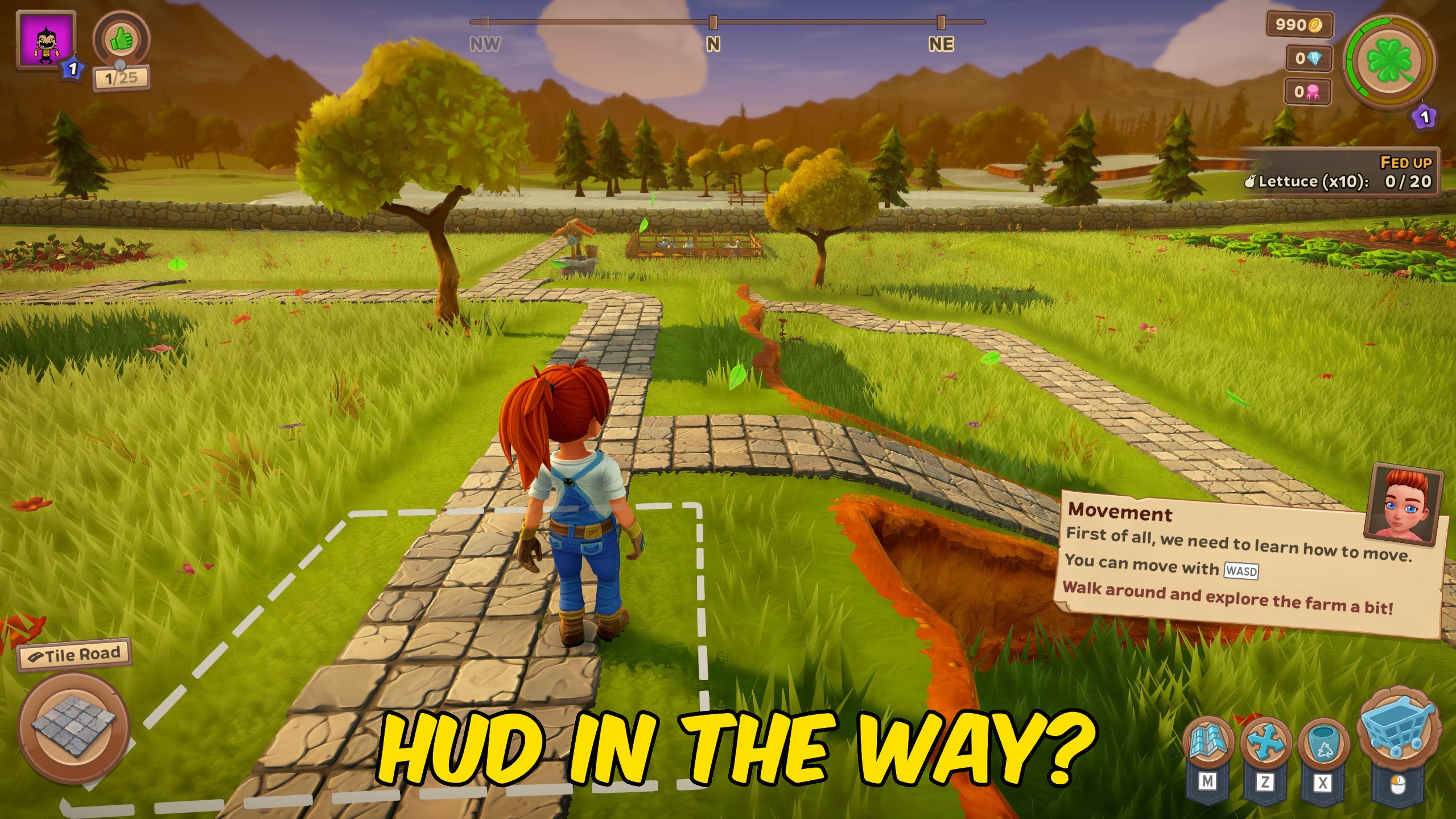
Clean View
Sweep away the buttons, bars, and pop-ups so nothing sits between you and your farm. Flip it on for a clean shot, flip it off to get back to playing.

Trophy Sweep
Instantly claim every award and trophy in Farm Together 2 with a single press. No more chasing the last few you missed.

Green Thumb
Tired of waiting on your crops? Hit one button and everything ripens fast — fields you've already planted are ready to harvest now, and everything you sow from here grows in a blink.







