Want more mods for Farm Together 2? Explore our entire collection!
Clean View
"One click clears every menu and meter off your screen for the perfect farm photo."
How do I install Clean View?
Download the free ProjectMods desktop app, then install Clean View for Farm Together 2 in one click.
</>What does Clean View do?
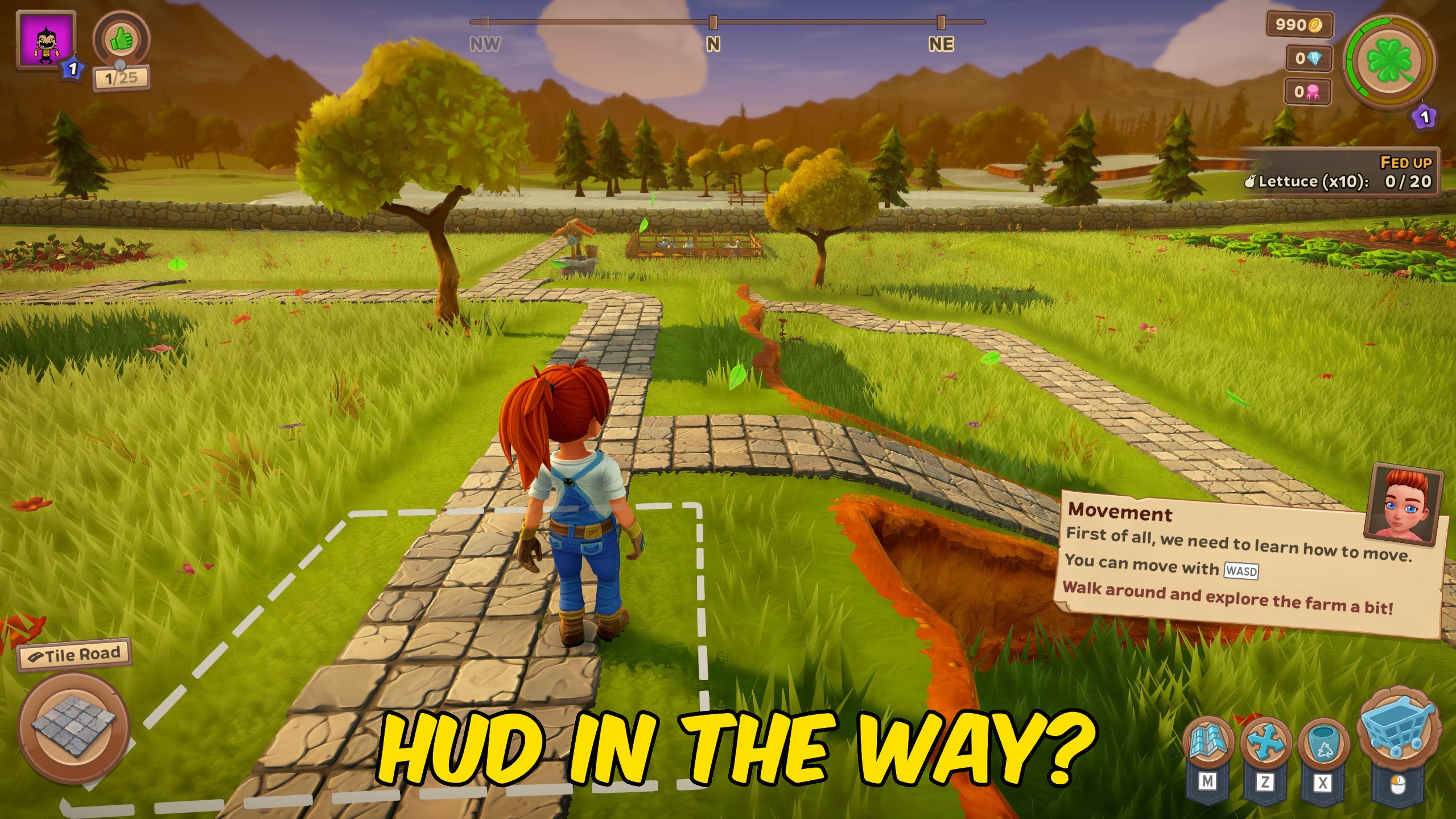
Your farm is gorgeous, so why let the interface get in the way? Clean View instantly hides the whole heads-up display — the coin counters, the toolbar, the mini-map, every panel and prompt — leaving you with a spotless, edge-to-edge look at your land. It's perfect for grabbing screenshots, recording clips, or just soaking in the view without the clutter. Turn it on and the screen clears in an instant. Turn it off and everything snaps right back exactly where it was, so you never lose your place. The game keeps running the whole time — nothing is disabled, it's just tucked out of sight. Great for photo mode moments, wallpaper-worthy shots, and showing off the farm you built.
</>What is Clean View?
Farm Together 2 is gorgeous, and Clean View gets the interface out of the way so you can see it. One toggle clears the counters, toolbar, mini-map, and every panel for spotless screenshots, then snaps it all back exactly where it was. From ProjectMods, the community-first PC mod manager for 400+ games including Cities: Skylines, Timberborn, and Wobbly Life.
</>Common questions about Clean View
What does Clean View do in Farm Together 2?
Clean View hides the entire heads-up display in Farm Together 2, giving you an unobstructed, edge-to-edge look at your farm. Flip on the Hide HUD toggle and the coin counters, the toolbar, the mini-map, every panel and prompt clear off the screen in an instant. Nothing in the game is switched off while they're gone — crops keep growing and everything you had running carries right on. Turn the toggle off and the whole interface snaps back exactly where it was, so you never lose your place. Clean View sits alongside the rest of the Farm Together 2 mods in ProjectMods, the community-first PC mod manager and desktop app for 400+ games.
What exactly disappears when Clean View hides the HUD?
Everything the game draws on top of your farm. In Farm Together 2 that means the coin, bill, and medal counters in the corner, the toolbar along the bottom, the mini-map, the level readout, quest and reward panels, and every pop-up prompt that appears while you play. What's left is the farm itself — the fields, the trees, the buildings, the sky, and your farmer standing in the middle of it. Clean View clears them as one group rather than one at a time, so a single flip of the Hide HUD toggle gets you to a completely uncluttered shot. Bring them all back the same way.
Does turning off the HUD pause Farm Together 2 or stop my farm?
No. Clean View only hides the interface — Farm Together 2 keeps running exactly as it was underneath. Crops carry on ripening, timers carry on counting, and anything you had in progress before you flipped the toggle stays in progress. Your controls still work too, so you can walk around, pan the camera, and line up an angle with the screen completely clear. The only thing you lose while the HUD is hidden is the readouts themselves, which is the whole point. Nothing is disabled and nothing is reset. Flip Hide HUD off and every counter, bar, and panel returns with the same values it would have had if you'd never hidden it.
Can I bring the interface back mid-session, or do I have to restart?
You can bring it back any time — Hide HUD is a straight on/off toggle, not a one-way switch. Flip the toggle off in the ProjectMods app and the whole Farm Together 2 interface returns instantly, right where you left it: same toolbar, same counters, same mini-map, same open panels. There's no restart, no reload, and no need to leave your farm. That makes Clean View comfortable to use in the middle of a normal play session — clear the screen for a shot, take it, then bring the HUD back and carry on planting. Plenty of players just leave the toggle handy and flick it whenever a nice view shows up.
Why use Clean View instead of just cropping the HUD out of a screenshot?
Because cropping loses the shot. The Farm Together 2 heads-up display sits over the middle of the screen, not just the edges — the toolbar cuts across the bottom, counters sit in the corners, and prompts pop up wherever they like. Crop all that away and you've thrown out half your farm with it. Clean View gives you the full, uncut frame instead: every field, path, and building edge-to-edge at full resolution. That matters for wallpapers, for video where cropping isn't really an option anyway, and for recording a clip where a reward pop-up would otherwise land right in the middle of your best shot. Take the picture you actually wanted.
What options does Clean View include?
Hide HUD
Clears every menu, button, and meter off your screen for a clean, uncluttered view. Turn it off to bring the whole interface back.
Clean View is a Farm Together 2 mod from ProjectMods, the community-first PC mod manager, that hides the entire heads-up display with one toggle — coin counters, toolbar, mini-map, every panel — leaving a clean view of your farm. Toggle it off and the interface snaps straight back.
System Requirements
What features does Clean View include?
- Flip Hide HUD on and every counter, toolbar, meter, and pop-up clears off your screen instantly.
- Frame your farm edge to edge with nothing overlapping the fields and buildings you laid out.
- Switch it back off and the whole interface returns exactly where it was, no place lost.
- Keep farming while it's hidden — nothing is disabled, the clutter is just tucked out of sight.
- Grab screenshots and record clips without a single button photobombing your shot.
Best For
- Screenshot hunters chasing a wallpaper-worthy shot of their farm without a toolbar across the bottom.
- Creators recording a farm tour who need clean footage for an intro or some B-roll.
- Builders checking whether a new fence line or path actually looks right with no panels covering the corners.
- Streamers showing off a finished farm to chat and wanting the fields to fill the whole screen.
- Players who just want to stand in their orchard at sunset and look at it, uninterrupted.
More Mods for Farm Together 2

Sky Farmer
Take to the skies and soar over your farm. Flip on Fly Mode and drift wherever you want, passing right through fences, buildings, and walls like they aren't even there.

Trophy Sweep
Instantly claim every award and trophy in Farm Together 2 with a single press. No more chasing the last few you missed.

Farm Fortune
Top up your three farm currencies whenever you want. Set how much you want, press the button, and watch your coins, bills, and medals jump.







