Want more mods for Hollow Knight? Explore our entire collection!
Time Sheet
"However long it took, that's between you and Hallownest."
How do I install Time Sheet?
Download the free ProjectMods desktop app, then install Time Sheet for Hollow Knight in one click.
</>What does Time Sheet do?
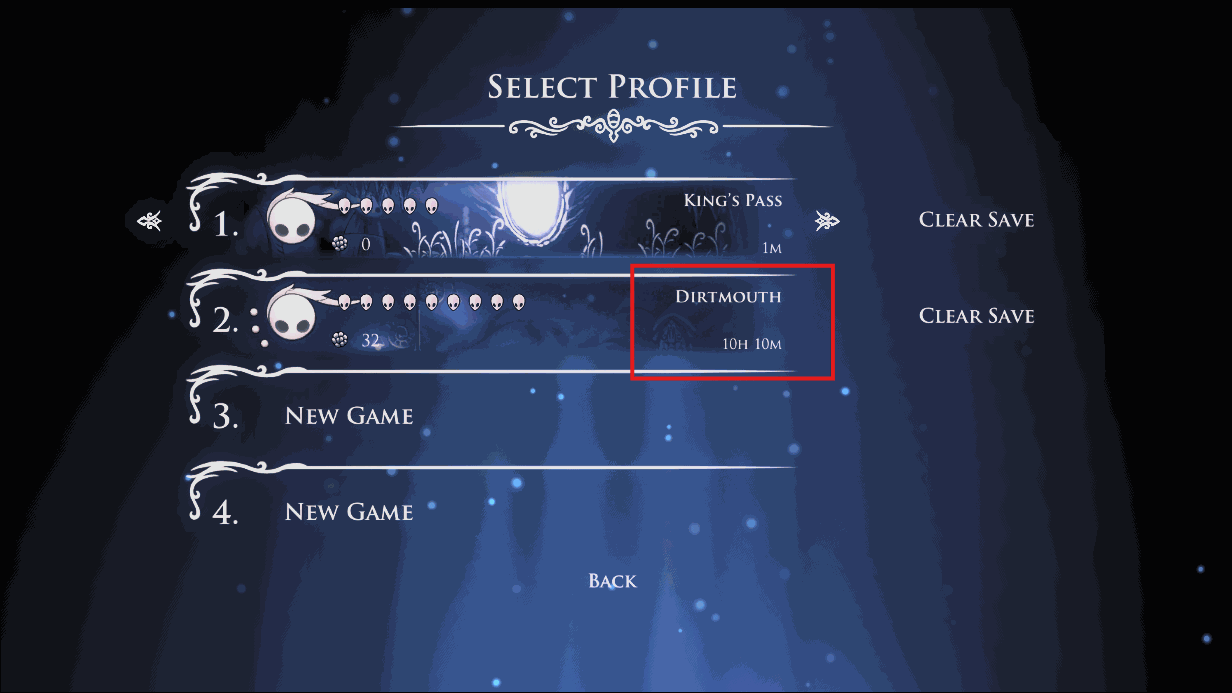
Hollow Knight puts your playtime on the save-select screen and on the completion screen at the end, and it counts everything - the hours you spent learning Hornet, the ones you spent stuck on a bench reading a wiki, and the ones where you walked into Deepnest by accident and left the game running. Time Sheet lets you set that figure. Enter hours and minutes, press the button, and your save reports that instead. The number updates on screen straight away rather than waiting for a reload, so what you see and what gets saved agree. This is the counter Hollow Knight keeps for itself - your Steam hours for the game are untouched. Handy if you are recording a run and would rather the number matched the attempt instead of the practice, or if you just want a tidier figure on a file you have poured a year into. Show Current reads back what the save holds right now, before you change anything. Nothing else about the save is touched - your charms, geo, map and completion percentage all stay exactly as they were.
</>What is Time Sheet?
Hollow Knight puts your playtime on the save-select and completion screens, and it counts every hour. Time Sheet lets you set that number: enter hours and minutes, press Set Playtime, and the save reports it straight away, no reload needed. Charms, geo, map and completion percentage stay exactly as they were. From ProjectMods, the community-first PC mod manager for 400+ games.
</>Common questions about Time Sheet
What does Time Sheet do in Hollow Knight?
Time Sheet sets the playtime figure recorded on your current Hollow Knight save. Hollow Knight shows that number on the save-select screen and again on the completion screen when you finish a run, and it counts everything - the hours you spent learning Hornet, the ones you spent stuck reading a wiki, and the ones where you left the game running on a bench. Time Sheet lets you decide what it says instead. You type in hours and minutes, press a button, and the save reports that figure. Nothing else about the file changes. Time Sheet installs from the ProjectMods launcher with one click.
How do I set the recorded playtime, and does the number update right away?
Time Sheet keeps it simple. Type the hours you want into the Hours box, add any extra minutes in the Minutes box, and press Set Playtime. Your Hollow Knight save reports that total straight away - you do not have to quit to the title screen and load the file again to see it. The new figure shows up wherever Hollow Knight displays your hours, including the save-select screen and the completion screen at the end of a run. Save the game the way you normally would and the number sticks. Change your mind later and just set a different figure.
Does Time Sheet change the playtime Steam shows for Hollow Knight?
No. Time Sheet only changes the figure Hollow Knight itself keeps on your save file - the one you see on the save-select screen and on the completion screen. Steam counts your hours separately, on its own, and nothing a mod does inside the game touches that. So if your Steam library says 210 hours and you set your save to 40, Steam will still say 210. Worth knowing before you plan anything around the number: the two figures are independent, and Time Sheet is only in charge of the Hollow Knight one. If you were hoping the two would line up, this mod only reaches the Hollow Knight side.
What does the Show Current button do?
Show Current is the look-don't-touch half of Time Sheet. It reads back the playtime your Hollow Knight save is reporting right now and shows it to you, without changing anything. Press it as often as you like and your save stays exactly as it was. It is worth pressing before you touch anything else, so you know the number you are starting from and can put it back later if you want to. It is also handy as a sanity check after you press Set Playtime: read the figure back, confirm it says what you asked for, then carry on playing.
Why would I want to change the recorded playtime on my Hollow Knight save?
Two reasons stand out. If you are recording a run for a video or a personal record, the save's clock has usually been running through all your practice attempts too, and Time Sheet lets the figure match the attempt you actually want on record. The other reason is simply tidiness - some people have poured a year into one Hollow Knight file and would rather the number on the save-select screen reflected the playthrough than every idle hour on a bench. Either way, nothing else on the save moves. Your charms, geo, map, completion percentage and achievements are all exactly where you left them.
What options does Time Sheet include?
Set Playtime
Press to set your recorded playtime to the hours and minutes above.
Show Current
Press to see what this save currently reports, without changing it.
Hours
The hours you want the save to report.
Minutes
Minutes on top of the hours above.
Time Sheet is a Hollow Knight mod from ProjectMods that sets the playtime figure your save reports - enter hours and minutes, press Set Playtime, and the number changes on screen and in the save. It does not touch your Steam hours.
System Requirements
What features does Time Sheet include?
- Type the hours and minutes you want, press Set Playtime, and your save reports that figure from then on
- Updates the number the game is already showing straight away, so what you see and what gets saved agree
- Press Show Current first to read back exactly what this file reports right now, without changing anything
- Leaves the rest of the save alone - charms, geo, map, completion percentage and achievements all stay put
- Touches only the counter Hollow Knight keeps for itself, so your Steam hours for the game are unaffected
Best For
- Creators filming a run who want the completion screen to reflect the actual attempt rather than the practice hours behind it
- Players who walked away from the game with it running in Dirtmouth and came back to a file reporting hours nobody played
- Anyone who has never looked at what their save actually reports and wants to read the figure back before deciding to touch it
- Streamers who get asked how long the file has taken every few minutes and want the save-select number to match the run on screen
- Completionists framing a screenshot of that final 112% screen who want the hours beside it to read cleanly
More Mods for Hollow Knight
/HollowKnightGlorySeekerAllAchievements1.png)
Glory Seeker (All Achievements)
Pop any Hollow Knight achievement you want — one at a time, or the whole set at once. Pick from the list and go, or grab the full 112%-worthy collection instantly.
/HollowKnightBOOMHeadShotInstantKill1.png)
BOOM HeadShot! (Instant Kill)
Every hit you land drops whatever it touches. Fodder, elite bugs and bosses all fall to a single swing of the nail.
/HollowKnightUnkillableInfiniteHealth1.png)
Unkillable (Infinite Health)
Keep your masks full and your Soul topped up no matter how hard Hallownest hits back. Bosses, spikes and endless pits stop mattering.



























































































































































































