Want more mods for House Flipper 2? Explore our entire collection!
Tool Shed (All Tools)
"Every tool, right from the start."
How do I install Tool Shed (All Tools)?
Download the free ProjectMods desktop app, then install Tool Shed (All Tools) for House Flipper 2 in one click.
</>What does Tool Shed (All Tools) do?
Tired of waiting to earn the tools you need for that perfect renovation? Tool Shed opens up the entire toolbox from the moment you flip the switch. Paintbrushes, power tools, cleaning gear, demolition equipment, precision instruments — everything the game has to offer, instantly available. Keep the toggle on and every tool stays unlocked even as you move between jobs. Hit the action button for a one-time unlock, or leave the toggle active so new tools are always ready when you need them.
</>What is Tool Shed (All Tools)?
Tool Shed by ProjectMods opens the entire toolbox in House Flipper 2 instantly. Paintbrushes, power tools, cleaning gear, demolition equipment, and precision instruments — all available from the moment you flip the switch. Keep the toggle on and every tool stays unlocked between jobs.
</>Common questions about Tool Shed (All Tools)
What does Tool Shed do in House Flipper 2?
Tool Shed from ProjectMods unlocks every renovation tool in House Flipper 2 instantly. Paintbrushes, power tools, cleaning equipment, demolition gear, precision instruments, and every other tool the game offers becomes available the moment you flip the switch. Instead of gradually earning tools through career progression, you get the full toolbox from the start. Keep the toggle on and tools stay unlocked across every job and property. Whether you're starting a new save or jumping into an existing one, Tool Shed ensures you always have the right tool for every task.
What types of tools does Tool Shed unlock in House Flipper 2?
Tool Shed for House Flipper 2 covers every tool category in the game. Painting tools for walls, ceilings, and trim. Tiling and flooring equipment for surfaces. Plumbing tools for fixtures and pipes. Electrical tools for wiring and outlets. Demolition equipment for walls, floors, and ceilings. Cleaning gear for scrubbing, vacuuming, and trash removal. Assembly tools for furniture and fixtures. Plus any specialized tools added through game updates or DLC you own. The mod doesn't unlock a subset — it opens the entire collection without exception.
Does Tool Shed keep tools unlocked between renovation jobs?
Yes. As long as Tool Shed is toggled on in ProjectMods, every tool stays unlocked across all your House Flipper 2 renovation jobs and properties. You never need to re-activate it when starting a new project or returning to a previous one. The persistent unlock means you can move between jobs freely without losing access to specialized equipment. If you toggle the mod off, the game reverts to its normal tool progression system where tools are gated behind career milestones, but anything you earned legitimately remains available.
How does Tool Shed's toggle work in House Flipper 2?
Tool Shed for House Flipper 2 features a single Enabled toggle in the ProjectMods app. Turn it on and every tool in the game unlocks immediately — no restart or reload required. The toggle takes effect right away, so you can activate it mid-renovation when you realize you need a tool you haven't earned yet. Turn it off to return to normal tool progression. The simplicity is intentional — one switch gives you everything, and one switch takes it back. No per-tool selection or category menus to navigate.
Is Tool Shed useful for experienced House Flipper 2 players?
Absolutely. Here's where experienced House Flipper 2 players get the most out of Tool Shed. Starting a new save file is the most common reason — veterans who've already unlocked everything once don't want to repeat the early grind. Players returning after a long break who've forgotten their progression state find it helpful for jumping straight back into full-capability renovations. Content creators who maintain multiple save files for different showcase themes use it to ensure every save has complete tool access. Even on a fully progressed save, the mod guarantees nothing is accidentally locked behind a new update or DLC requirement.
What options does Tool Shed (All Tools) include?
Enabled
Keep every tool unlocked as you move between jobs.
Unlock All Tools
Unlock the entire toolbox right now.
Tool Shed from ProjectMods unlocks every renovation tool in House Flipper 2 with one click so you have the full toolbox from the start.
System Requirements
What features does Tool Shed (All Tools) include?
- Unlock every renovation tool in the game the moment you flip the switch
- Keep all tools available across every job with no re-earning between projects
- Access paintbrushes, power tools, cleaning gear, demolition equipment, and precision instruments instantly
- Leave the toggle on so new tools unlock automatically as you start fresh contracts
Best For
- New players who want the full toolkit from the start instead of earning tools one by one
- Experienced flippers tired of replaying early jobs just to re-unlock tools on a new save
- Creative builders who need a specific tool for their vision and don't want to wait to earn it
- Players jumping between multiple renovation styles who need every tool category ready to go
More Mods for House Flipper 2
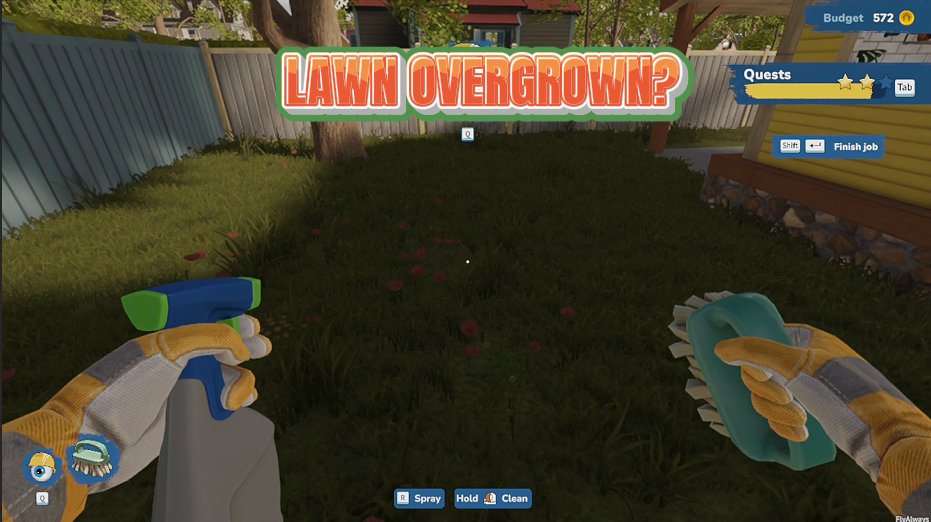
Lawn Genie
Set all the grass on the property to perfectly trimmed, tidily groomed, or wild and overgrown with a single click.
/HouseFlipper2TrophyCase1.png)
Trophy Case (All Achievements)
Pick any trophy from the full list and pop it on its own, or unlock the whole set at once — and put them all back whenever you want.

Turbo Legs (Speed Boost)
Crank your walking speed up to eleven and blaze through renovations at your own pace.







