Want more mods for Kindergarten? Explore our entire collection!
Fast Forward
"Blitz the slow bits, savour the chaos in slow motion."
How do I install Fast Forward?
Download the free ProjectMods desktop app, then install Fast Forward for Kindergarten in one click.
</>What does Fast Forward do?
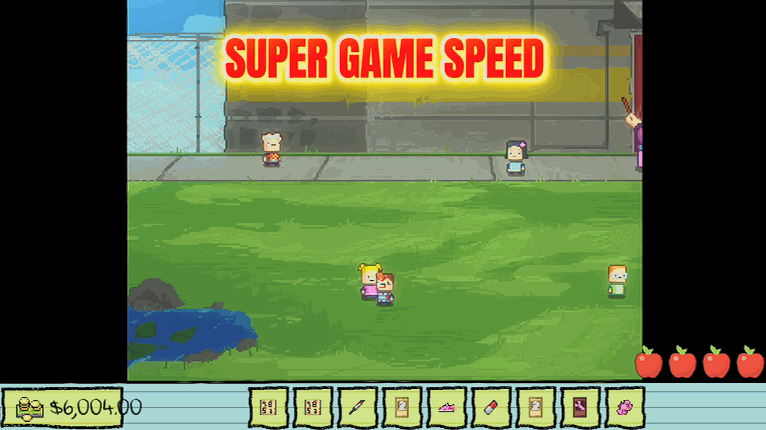
Replaying the same morning to chase a different ending gets old fast. Fast Forward puts the whole game on a speed dial. Crank it up to blitz through dialogue and scenes you've seen a dozen times, or dial it below 1x for slow motion when you want to savour a particularly chaotic moment. Flip the master switch off and everything snaps back to normal speed.
</>What is Fast Forward?
Replaying the same morning to chase a different ending gets old fast. Fast Forward puts all of Kindergarten on one speed dial — crank it to 4x to blitz scenes you've seen a dozen times, or drop below 1x for slow motion when the mayhem is worth savouring. Flip the master switch off to snap back to normal. Free in the ProjectMods launcher.
</>Common questions about Fast Forward
What does Fast Forward do in Kindergarten?
Fast Forward is a mod for Kindergarten that puts the entire game on an adjustable speed dial. Using the Game Speed slider you can run everything faster — up to 4x — to blitz through dialogue and scenes you've already watched, or drop below 1x for slow motion when a chaotic playground moment is worth lingering on. A master switch called Change Speed turns the whole effect on and off, so the game snaps back to its normal pace whenever you want it. It's built for players replaying the same day over and over to chase different endings, where sitting through familiar cutscenes at normal speed wears thin. It's a free-tier mod in the ProjectMods launcher.
How far can I speed up or slow down Kindergarten?
The Game Speed slider in Fast Forward runs from slow motion all the way up to 4x normal speed in Kindergarten. At the top end, 4x rockets you through repeated mornings, long conversations, and scenes you've already seen so you reach the choice you actually care about faster. Anywhere below 1x drops you into slow motion, which is perfect for watching a bit of playground chaos unfold beat by beat instead of in a blur. 1x is exactly the game's normal pace, so you can dial back to it any time. Because the slider affects the whole game rather than just your character, everything — dialogue timers, animations, and other kids — speeds up or slows down together, keeping the world in sync at whatever pace you pick.
Does Fast Forward speed up everything or just my character?
Fast Forward changes the pace of the whole Kindergarten world, not just your kid. When you push the Game Speed slider up, the other children, the teachers, the dialogue, the timers, and the background action all run at the same faster rate together, so nothing falls out of step. That matters because Kindergarten's missions rely on timing — being in the right room when something happens — and a speed dial that only sped up your movement would break those moments. Slowing everything below 1x works the same way in reverse: the entire scene eases into slow motion as one piece. If you specifically want just your movement quicker while the world stays normal, that's a different job — the Sugar Rush mod handles player speed on its own.
What's the difference between the Change Speed switch and the Game Speed slider?
Fast Forward gives you two controls in Kindergarten that work together. Change Speed is the master switch — the on/off toggle for the whole mod. Flip it off and the game instantly returns to its normal, unmodified pace no matter where the slider sits. Game Speed is the dial that decides how fast or slow things run while the switch is on: 1x is the game's normal speed, higher values (up to 4x) fast-forward everything, and values below 1x ease into slow motion. In practice you set the slider once to the pace you like, then use Change Speed to pop in and out of it — sprinting through a scene you've seen, then snapping back to normal for a moment you want to actually play at full speed.
Why would I want slow motion in Kindergarten?
Slow motion turns Kindergarten's quick, chaotic beats into something you can actually watch. The game is full of split-second gags — a kid getting launched, a plan going gloriously wrong, a grisly playground demise — that fly by at normal speed. Drop the Game Speed slider below 1x and those moments unfold slowly enough to enjoy every detail, which is gold for content creators grabbing clean footage or anyone who just wants to savour the mayhem. It's the flip side of fast-forwarding: speed up the parts you've seen a hundred times, then slow the good bits right down. Because the whole scene slows together, the comedy stays perfectly composed rather than turning into a jittery blur, so nothing about the timing looks off.
What options does Fast Forward include?
Change Speed
Master switch. Turn it off to return the game to normal speed.
Game Speed
How fast the whole game runs. 1x is normal, below 1x is slow motion.
Fast Forward is a free ProjectMods mod for Kindergarten that puts the whole game on a speed dial, from slow motion up to 4x, so you can blitz repeated days or slow a chaotic moment right down.
System Requirements
What features does Fast Forward include?
- Puts the whole game on a speed dial, from a crawling slow motion up to a brisk 4x.
- Blitz through dialogue and scenes you've already watched a dozen times on a replay.
- Dial below 1x for slow motion to savour a chaotic death and catch every gross detail.
- Flip the master switch off and everything snaps straight back to normal speed.
Best For
- Grinding the same morning again for a different ending and sick of the slow build-up.
- Content creator who wants one gruesome moment in crisp slow motion for the edit.
- Speedrun-minded player blitzing known days to reach the one scene they're actually testing.
- Streamer skimming past repeat dialogue so chat doesn't sit through it a second time.
More Mods for Kindergarten
/KindergartenStickyFingers1.png)
Sticky Fingers (Item Grabber)
Pick any item from a searchable list and drop it straight into your backpack — keys, tools, quest pieces, even Monstermon cards.
/KindergartenNineLives1.png)
Nine Lives (Death-Proof)
Lethal moments stop sending you back to the last checkpoint — you shrug them off and keep playing so you can explore without fear.
/KindergartenSugarRush1.png)
Sugar Rush (Fast Feet)
Slide a speed dial to zip around the school. Great for beating tight timers and skipping the slow walk between classrooms.







