Want more mods for Kindergarten? Explore our entire collection!
Sticky Fingers (Item Grabber)
"Every key, tool, and trading card — straight into your backpack."
/KindergartenStickyFingers1.png)
How do I install Sticky Fingers (Item Grabber)?
Download the free ProjectMods desktop app, then install Sticky Fingers (Item Grabber) for Kindergarten in one click.
</>What does Sticky Fingers (Item Grabber) do?
Missing the one item that unlocks a whole story path? Sticky Fingers lets you hand yourself anything in the game. Refresh the list, search for what you need — a hall pass, the gold key, a laser pointer, or any of the collectible Monstermon cards — and it appears in your backpack instantly. Perfect for finishing a stubborn mission, completing your card collection, or setting up the exact run you want.
</>What is Sticky Fingers (Item Grabber)?
Missing the one item that unlocks a whole story path in Kindergarten? Sticky Fingers hands you anything in the game. Refresh the list, pick what you need — a hall pass, the gold key, or any collectible Monstermon card — and it lands in your backpack instantly. Great for a stubborn mission, a full card collection, or setting up an exact run. A premium mod in the ProjectMods launcher.
</>Common questions about Sticky Fingers (Item Grabber)
What does Sticky Fingers do in Kindergarten?
Sticky Fingers is a mod for Kindergarten that lets you hand yourself any item in the game. You open a searchable list of everything Kindergarten contains, pick what you want, and drop it straight into your backpack. That covers the practical stuff missions hinge on — hall passes, the gold key, tools like a laser pointer — as well as collectibles like the Monstermon trading cards. It's built for those moments when a whole story path is blocked because you're missing one specific object, or when you'd rather set up an exact run than hunt an item down the long way. Completing your Monstermon card collection becomes trivial too. Sticky Fingers is a premium mod in the ProjectMods launcher.
How do I grab an item with Sticky Fingers?
Grabbing an item in Kindergarten takes three quick steps with Sticky Fingers. First, press Refresh Item List once you're loaded into a save — that loads every item in the game into the dropdown. Next, use the Select Item dropdown to find and choose what you want; it's searchable, so you can type toward a hall pass, the gold key, or a specific Monstermon card instead of scrolling forever. Finally, press Give Item and the chosen object appears in your backpack right away. You can repeat the last two steps as often as you like to pull multiple items in a row. The only thing to remember is that first Refresh — the list starts empty until you press it, which trips up players who expect the dropdown to be pre-filled.
Why is the Select Item dropdown empty when I first load Kindergarten?
That's expected, and it's an easy fix. Sticky Fingers builds its item list the moment you press Refresh Item List, not the instant the game boots — so before you press it, the Select Item dropdown looks empty. This is deliberate: Kindergarten needs to be fully loaded into a save before the mod can pull together the full item list, so it's gathered on demand rather than too early. Once you're actually in a save, press Refresh Item List once and the dropdown fills with everything you can grab. From then on you can select and give items freely for that session. If it ever looks empty again after a big change, just press Refresh once more to rebuild the list. One tap is all it takes.
Can Sticky Fingers give me Monstermon cards and quest items too?
Yes — if it exists in Kindergarten, Sticky Fingers can put it in your backpack. That includes the mission-critical objects some story paths are gated behind, like the gold key, hall passes, and tools such as a laser pointer, as well as the collectible Monstermon trading cards. Because the mod loads the game's full item list when you press Refresh, anything the game tracks as an item is fair game to grab. That makes it a fast way to complete your Monstermon set without trading for every card the slow way, or to unblock a mission the instant you realise you're missing the one piece it needs. You pick from the searchable dropdown and press Give Item, and it's yours — whether it's a key story object or a card you just want for the collection.
When should I use Sticky Fingers in Kindergarten?
Sticky Fingers earns its keep whenever a Kindergarten mission stalls on a single missing item. Some story paths simply won't advance until you're holding the right object, and tracking it down can mean replaying days or following a precise sequence you may not know yet. Instead, grab the item directly and keep the story moving. It's just as handy for collectors chasing a complete Monstermon card set, since you can fill in the ones you're missing in seconds rather than grinding trades. Players who like to set up a very specific run — starting a save already equipped for a particular scheme — will also get a lot out of it. And for content creators, it's a quick way to reach a story beat on camera without a long item hunt padding the video.
What options does Sticky Fingers (Item Grabber) include?
Select Item
Pick the item you want to grab.
Refresh Item List
Load every item in the game into the dropdown. Do this once after you're in a save.
Give Item
Drop the selected item into your backpack.
Sticky Fingers is a ProjectMods mod for Kindergarten that lets you pick any item from a searchable list and drop it into your backpack, from the gold key to any Monstermon card.
System Requirements
What features does Sticky Fingers (Item Grabber) include?
- Hand yourself any item in the game — hall passes, the gold key, tools, quest pieces — right into your backpack.
- Search a full dropdown of everything the game holds and grab exactly what you need.
- Complete your Monstermon card collection without hunting every card down the long way.
- Refresh the list once inside a save and every item is ready to pick and pull.
Best For
- You're missing the one item a story path needs and won't replay days to find it.
- Card collector filling the last gaps in a Monstermon set in a single sitting.
- Player prepping an exact run with every tool already in the backpack before they start.
- Content creator staging a scene that needs a specific item on hand right now.
More Mods for Kindergarten
Wall of Fame
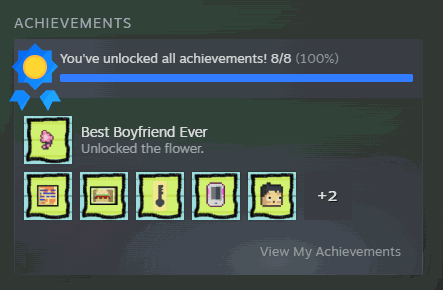
Award any Steam achievement, or every one at once. There's a clear button too if you want to wipe the slate and earn them for real.
Fast Forward
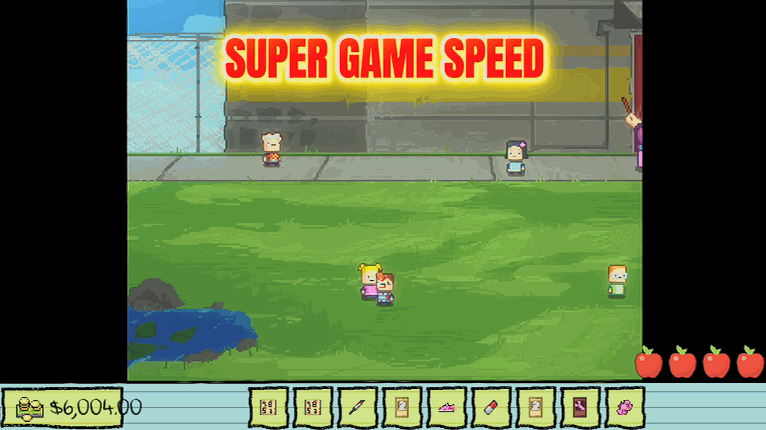
A game-speed dial from slow motion up to 4x. Fast-forward through repeated days, or slow the mayhem down to catch every detail.
/KindergartenSugarRush1.png)
Sugar Rush (Fast Feet)
Slide a speed dial to zip around the school. Great for beating tight timers and skipping the slow walk between classrooms.







