Want more mods for Muck? Explore our entire collection!
Screenshot Mode
"Your screen called. It wants its space back."
How do I install Screenshot Mode?
Download the free ProjectMods desktop app, then install Screenshot Mode for Muck in one click.
</>What does Screenshot Mode do?
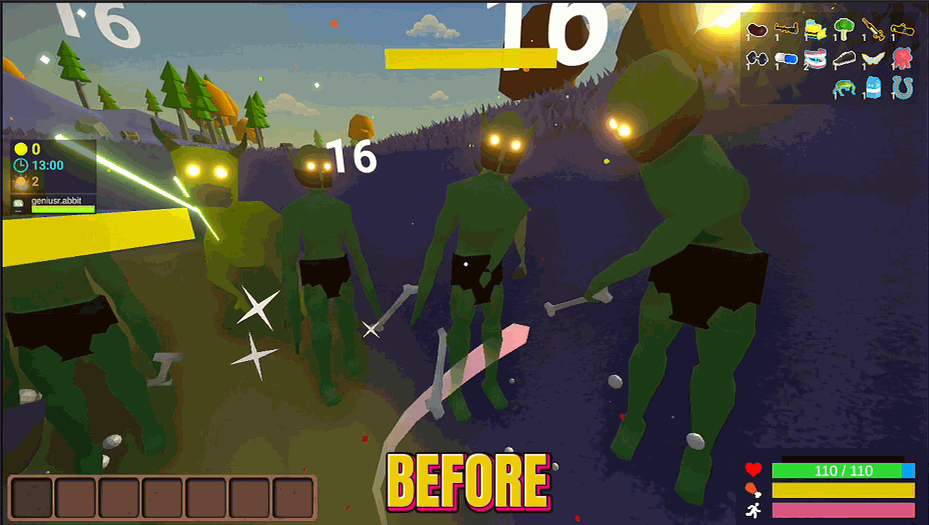
Sometimes you want to admire the beautiful world of Muck without a health bar, inventory, and seventeen other UI elements cluttering up your screen. Screenshot Mode lets you toggle the entire HUD on and off with a single button. Press once - HUD gone. Press again - HUD back. That's it. That's the whole mod. Perfect for content creators who need clean footage, screenshot enthusiasts who want that cinematic look, or anyone who wants to play on hard mode by having literally no idea how much health they have left. Warning: Playing without HUD means you won't know when you're about to die. Which is kind of exciting, honestly.
</>What is Screenshot Mode?
Screenshot Mode is a HUD toggle mod for Muck that strips every UI element off your screen on demand. One option, one button, one clean view of the game world. Built for content creators capturing clean Muck footage for YouTube, TikTok, or Twitch, screenshot enthusiasts who want that wallpaper-grade cinematic look, and players who want to try Muck on hard mode by playing without any visible health or resource readouts.
</>Common questions about Screenshot Mode
What does Screenshot Mode do in Muck?
Screenshot Mode is a ProjectMods Muck mod that hides the entire HUD (health bar, hotbar, stamina, inventory, prompts, and every other UI element) with a single toggle. Flip Hide HUD on for a clean screen, flip it off to bring the interface back. Designed for taking cinematic screenshots and recording clean footage. The toggle sticks across scene changes, menu transitions, and respawns, so you never have to keep flipping it back on. When you disable or unload the mod, the HUD restores automatically.
How do I hide the HUD in Muck with this mod?
Install Screenshot Mode through the ProjectMods desktop app, enable the mod for Muck, then toggle the Hide HUD option in the mod's settings panel. The HUD will disappear within a second. Toggle it off to bring the HUD back. The mod doesn't require a Muck restart — the change applies live during gameplay. Useful for switching between gameplay (HUD on for actual play) and screenshot/recording mode (HUD off for clean visuals) on the fly during a single session, all controlled through the ProjectMods overlay.
Will I still be able to play Muck without the HUD showing?
Yes, all gameplay continues exactly as normal in Muck with Screenshot Mode active. You just won't see your health bar, stamina, hotbar, or inventory readouts. Combat, mining, building, and movement all work the same way. Fair warning: you also won't see when you're about to die, which is part of the fun if you're playing for the cinematic experience or running a self-imposed hard mode. The ProjectMods toggle means you can flip the HUD back the second you need it, so you're never permanently stuck blind in a fight.
Does Screenshot Mode work for recording video, not just screenshots?
Yes. Screenshot Mode for Muck doesn't care if you're capturing a single frame or recording hours of footage. Toggle Hide HUD on before you start recording for clean cinematic video, toggle it back off when you're done. Works with OBS, ShadowPlay, NVIDIA Broadcast, or any other capture tool because the mod just changes what's drawn on screen — it doesn't interfere with capture pipelines at all. The result is footage that looks like a custom cinematic edit instead of raw gameplay, which is exactly what content creators need for ProjectMods Muck videos.
Does Screenshot Mode hide everything on screen, including chat and menus?
It hides Muck's in-game HUD canvas, which covers all gameplay UI like health, stamina, hotbar, inventory, and on-screen prompts. Menus you open manually (pause menu, inventory screen) still appear when you trigger them, so you can navigate normally even while Screenshot Mode is active. This is intentional — the goal is clean gameplay footage, not preventing you from accessing the game's menus. Through ProjectMods you can also disable the toggle entirely if you want a normal session, or leave it on permanently for a long cinematic recording stretch.
What options does Screenshot Mode include?
Hide HUD
Press this to hide or show all the stuff on your screen (health bar, items, etc.). Great for taking cool screenshots!
Screenshot Mode is a ProjectMods mod for Muck that hides the entire HUD (health bar, inventory, UI elements) with a single toggle so you can capture clean screenshots and cinematic video footage.
System Requirements
What features does Screenshot Mode include?
- One button toggles the entire HUD on or off — that's it, that's the mod
- Clean footage for screenshots, cinematic clips, or just admiring the world
- Press again to bring everything back the second you need it
Best For
- Content creators capturing clean Muck gameplay without UI clutter
- Screenshot hunters chasing that cinematic shot of the island at sunset
- Playing on hard mode with no health bar because chaos is fun
More Mods for Muck

Skip the Lecture (Instant Tutorial Skip)
Clear the tutorial prompts instantly and get straight to playing. One press and the hand-holding is gone.
/MuckCraftInThinAirFreeCraft1.png)
Thin Air Crafting (Free Build & Repair)
Craft anything and repair your gear without spending materials. Build your whole setup instantly, even with an empty inventory.
/MuckCtrlSSaveGame1.png)
Quicksave (One-Press Save)
Save your run instantly whenever you want, with a button or a Ctrl+S hotkey. No more losing progress to a crash or a surprise death.







