Want more mods for Wobbly Life? Explore our entire collection!
Vanishing Act (Smoke Teleport)
"Vanish in a puff of smoke and reappear wherever you like."
/WobblyLifeVanishingAct1.jpg)
How do I install Vanishing Act (Smoke Teleport)?
Download the free ProjectMods desktop app, then install Vanishing Act (Smoke Teleport) for Wobbly Life in one click.
</>What does Vanishing Act (Smoke Teleport) do?
Some wobblies walk. Some wobblies drive. Yours vanishes in a cloud of smoke and turns up somewhere else entirely. Vanishing Act wraps every teleport in the game's own puff of smoke. Hit Poof Forward and your wobbly disappears on the spot, then reappears a set distance ahead in a second cloud. Point the map marker somewhere and Poof to Map Marker takes you there the same way. Pick a friend from the player list and Poof to Selected Player drops you right beside them. Set the Vanish Time for a quick blink or a slow, dramatic entrance. Filming a series or running a roleplay? Remember This Spot saves up to five positions, facing direction included, and they stay saved between sessions. Poof to Spot then lands you on your mark every single take. Give each character its own signature smoke while you are at it: pick any colour, size the cloud from a subtle wisp to a stage-magician blast, and set how long it lingers, from a snappy puff to fog that drifts long after you are gone. The villain trails purple haze; the hero snaps away in gold. Smoke is a mod-crew thing: everyone running Vanishing Act sees every player's clouds in their chosen style, so kit the whole lobby out and every camera angle gets the effect. Friends without the mod simply see you hop from spot to spot in an instant. If you are a guest in someone else's session, the host needs Vanishing Act installed too, since the host does the actual poofing. Map Poof Forward to a hotkey in the launcher and you can vanish mid-scene without ever leaving the game.
</>What is Vanishing Act (Smoke Teleport)?
Vanishing Act wraps every Wobbly Life teleport in a puff of smoke, in your own colour, size and hang time. Poof ahead, jump to your map marker, land beside a friend, or save five spots and hit your mark on every take of your roleplay series. Everyone running the mod sees each player's signature clouds; friends without it see a clean instant teleport. One of 1,600+ mods in ProjectMods, the community-first PC mod manager for 400+ games across Unity, Unreal, and Godot, from Wobbly Life to Human Fall Flat and Brick Rigs.
</>Common questions about Vanishing Act (Smoke Teleport)
What does Vanishing Act (Smoke Teleport) do in Wobbly Life?
Vanishing Act is a Wobbly Life mod from ProjectMods that teleports your wobbly inside the game's own puff of smoke. Your character disappears in one cloud and pops back out in a second cloud somewhere else: a set distance straight ahead with Poof Forward, at the marker you placed on the map with Poof to Map Marker, right beside a chosen player with Poof to Selected Player, or at one of five saved positions with Poof to Spot. Everyone running Vanishing Act sees both clouds in the poofing player's chosen colour, size and hang time; friends without the mod simply see the wobbly switch spots in an instant. A Vanish Time slider sets how long you stay gone between the two puffs, so the same teleport can be a quick blink or a slow, dramatic entrance.
How do the five saved spots work in Vanishing Act?
Vanishing Act gives you five saved spots in Wobbly Life, and each one remembers both where you were standing and which way you were facing. Pick a slot from the Spot dropdown, stand exactly where you want, and press Remember This Spot to store it. From then on, Poof to Spot vanishes you in a puff of smoke and drops you back on that exact mark, already facing the right direction. The Saved Spots panel shows where each of the five currently points, so you always know which slot is which. Spots are kept on your PC between sessions, so the positions you set up for a scene on Monday are still waiting when you load Wobbly Life on Friday. To move a spot, just pick its slot and press Remember This Spot again.
Does Vanishing Act work when I'm a guest in a friend's Wobbly Life lobby?
Yes, as long as the host also has Vanishing Act installed, because in an online Wobbly Life session the host does the actual poofing for everyone. As a guest, every poof you trigger is carried out by the host, who makes your wobbly vanish and reappear. If the host does not have the mod, nothing happens and a clear warning appears on your screen after a few seconds, so you are never left guessing. When you are the host yourself, everything works for you directly. The smoke itself shows for everyone running Vanishing Act, in each player's chosen style, while friends without the mod just see you switch spots instantly. Hosts also get a Bring Everyone Back button that pops any wobbly hidden by a connection hiccup back into view.
What do the Poof Distance and Vanish Time sliders do in Vanishing Act?
Poof Distance sets how far Poof Forward sends you, and Vanish Time sets how long you stay gone between the two puffs of smoke. Poof Distance runs from 3 to 40 metres, with 10 as the default, and always measures in the direction your wobbly is facing. If a wall is in the way, you stop just short of it instead of ending up inside it, and you land on the ground beneath the target point. Vanish Time runs from 0.3 to 3 seconds, with 0.6 as the default: keep it short for a quick blink that barely interrupts the action, or push it toward 3 seconds for a slow, dramatic reveal in a Wobbly Life scene. Both sliders sit in the ProjectMods launcher next to the poof buttons, so Vanishing Act is easy to retune between takes.
Why would I use Vanishing Act instead of just walking or driving in Wobbly Life?
Because Vanishing Act is built for moments where how you arrive matters more than getting there, which is why it suits filming a Wobbly Life series or running a roleplay. Map Poof Forward to a hotkey in the ProjectMods launcher and you can vanish mid-scene without leaving the game, then use Poof to Spot to hit the same mark on every take. Poof to Selected Player gets you beside a friend instantly: press Refresh Players, pick their name, and poof. One thing to know: you cannot poof while sitting in a vehicle, so hop out first. It also pairs naturally with other ProjectMods Wobbly Life mods such as Fly, Morph and Wobbly Size, so a morphed or resized wobbly can still make a dramatic smoke-cloud entrance.
What options does Vanishing Act (Smoke Teleport) include?
Poof Distance
How far Poof Forward sends you, in the direction you are facing.
Smoke Linger
How long each puff hangs in the air before fading. Turn it down for a quick wisp, or crank it right up for smoke that drifts around long after you are gone.
Smoke Size
How big your smoke cloud is, from a subtle wisp at 50% to a full stage-magician blast at 300%.
Spot
Pick which of your five saved spots the two buttons below use.
Poof to Selected Player
Vanish and reappear right beside the chosen player.
Vanish Time
How long you stay gone between the two puffs of smoke. Short for a quick blink, long for a dramatic entrance.
Bring Everyone Back
Host only. If a connection hiccup ever leaves a wobbly hidden, this pops everyone back into view.
Poof to Spot
Vanish and reappear at the chosen saved spot. Perfect for hitting your mark in a scene.
How It Works
Every poof puts a puff of smoke where you left and another where you land. Friends need Vanishing Act to see the smoke and your colours; without it they just see you switch spots in a blink. Online, the host needs the mod too, since the host does the actual poofing.
Poof Forward
Vanish and reappear straight ahead of you. Best mapped to a hotkey so you can poof mid-scene.
Smoke Colour
Tint your smoke. Purple for the villain, gold for the hero. Friends see your colour if they run Vanishing Act too. Leave it white for the classic look.
Remember This Spot
Save where you are standing, facing direction included, into the chosen spot. Spots stay saved between sessions.
Saved Spots
Where each of your five saved spots currently points.
Select Player
Choose the player you want to poof over to. Press Refresh Players first.
Poof to Map Marker
Vanish and reappear at the marker you placed on the map.
Refresh Players
Rebuild the list of players in your session.
Vanishing Act is a Wobbly Life mod from ProjectMods that teleports your wobbly in a puff of smoke: poof forward, to your map marker, beside a friend or to one of five saved spots, with your own smoke colour, size and hang time shown to every player running the mod.
System Requirements
What features does Vanishing Act (Smoke Teleport) include?
- Vanish and reappear 3 to 40 metres ahead with Poof Forward; it stops short of walls and lands you on the ground below.
- Jump straight to your map marker, or pick any name from the player list and land right beside that friend.
- Save up to five spots, facing direction included, and they stay remembered between sessions so you hit your mark every take.
- Dial the Vanish Time from a 0.3-second blink to a slow three-second dramatic entrance between the two clouds.
- Give each wobbly its own smoke: pick any colour and set the cloud from a subtle wisp to a stage-magician blast.
- Set how long each puff hangs around, from a snappy wisp to slow drifting fog, and every friend running the mod sees your clouds in your style.
Best For
- Creators filming a Wobbly Life series who need their superhero wobbly to vanish on cue and land on the same mark every take, using saved spots and a launcher hotkey.
- Roleplayers playing the lobby's resident magician or ninja who want a slow, dramatic disappearing act with lingering coloured smoke that every modded-up friend in the session can see.
- Friend groups scattered across the map who would rather poof straight to a mate's side than drive the whole way over for a stunt or a group photo.
- Lobby hosts who want their friends' poofs to work, since the host does the actual poofing, and who get a one-press Bring Everyone Back if a connection hiccup ever hides a wobbly.
- Anyone building a full superhero kit who pairs Vanishing Act with Fly, Morph and Wobbly Size for a wobbly that can fly, change shape and size, and vanish on command.
More Mods for Wobbly Life
/WobblyLifeWeatherWizardWeatherTimeControl1.jpg)
Weather Wizard (Weather & Time Control)
Take total control of the sky. Freeze time at any hour, force the weather to whatever you fancy and lock it there, crank the rain, thicken the fog, and call down lightning on command. Best in single-player or as the host, since Wobbly Life's weather is run by whoever owns the world.
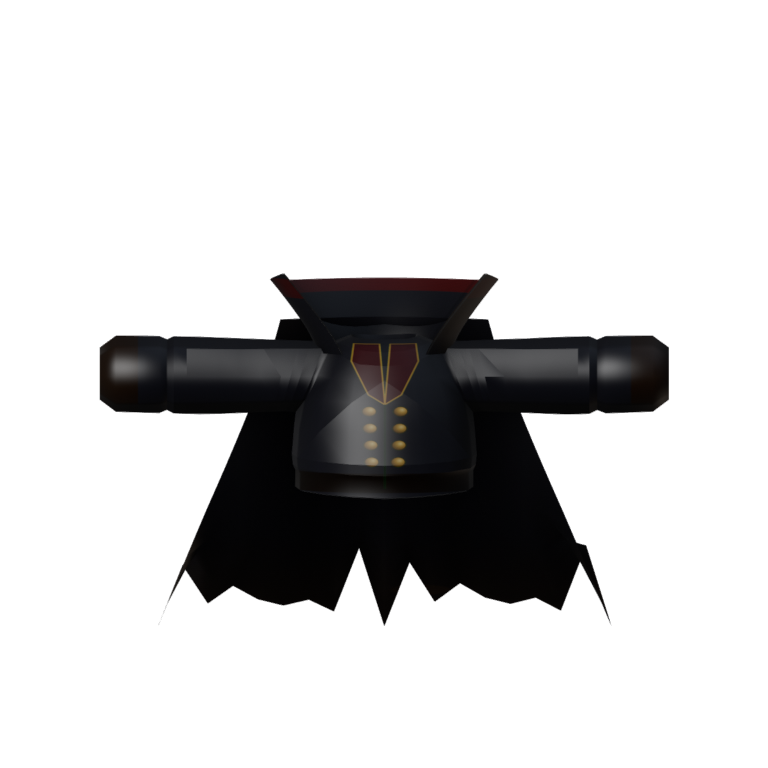
Hollow Rider Cloak
A black riding coat with a double row of brass buttons, leather gloves, a tall stand-up collar and a long tattered cloak that sways behind you as you walk. Part of the Hollow Rider set.
/WobblyLifeNewtonSDayOffGravityEditor1.jpg)
Newton's Day Off (Gravity Editor)
Bend gravity to your will. Crank it up, switch it off, flip it upside-down, or send everything flying sideways - then your wobbler flips to match so you can take in the mayhem. Instant presets for Moon, Space, Reverse, and Heavy, or dial in your own.







