Want more mods for Graveyard Keeper 2 Demo? Explore our entire collection!
Hoarder's Habit
"Carry half the graveyard home in one trip."
How do I install Hoarder's Habit?
Download the free ProjectMods desktop app, then install Hoarder's Habit for Graveyard Keeper 2 Demo in one click.
</>What does Hoarder's Habit do?
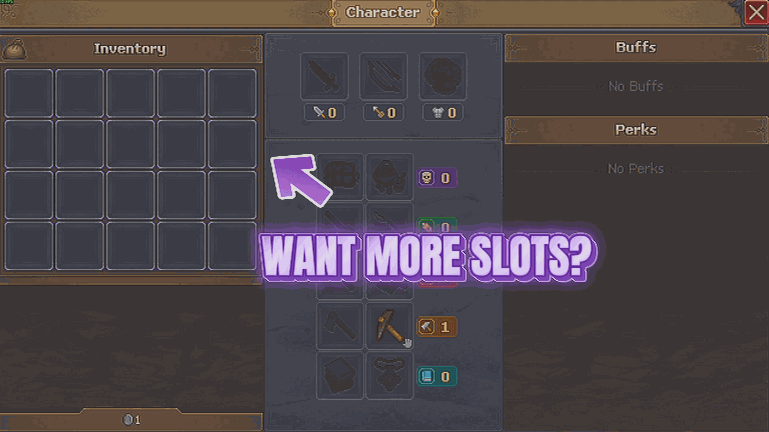
Every trip out of the graveyard ends the same way: you find a great patch of resources, you fill up, and then you spend five minutes working out what to throw on the floor. Hoarder's Habit ends that. Your main bag can go from its usual twenty slots up to a hundred and twenty, and your tool belt from fourteen up to sixty, so you can grab everything you see and sort it out later at the workbench. You set both numbers yourself with a pair of dials, so you can go for a gentle bump that keeps the game feeling honest, or open the floodgates for a big clear-out run. Turning the mod off puts you back to the sizes you started the game with. One promise: nothing you own ever gets thrown away. If you are still carrying more than a starting bag would hold when you switch the mod off, it simply waits and tells you, rather than quietly deleting the overflow. Put some of it in a chest and your slots tidy themselves away on their own.
</>What is Hoarder's Habit?
Hoarder's Habit takes your Graveyard Keeper 2 Demo main bag from its usual twenty slots up to a hundred and twenty, and your tool belt from fourteen up to sixty, with a dial for each so you choose the size. Nothing you own is ever thrown away when you switch back. From ProjectMods, the community-first PC mod manager behind mods for Valheim, Dinkum, Raft and 400+ more games.
</>Common questions about Hoarder's Habit
What does Hoarder's Habit do in Graveyard Keeper 2 Demo?
Hoarder's Habit gives you a much bigger bag and tool belt in Graveyard Keeper 2 Demo so a gathering run does not end with you standing in a field deciding which logs to abandon. Turn on Bigger Bag, then set Main Slots and Tool Belt Slots to whatever sizes you want. Your main bag normally starts at twenty slots and can go up to a hundred and twenty, while the tool belt starts at fourteen and can reach sixty. Turn the master switch off and you are back to the sizes you started the game with.
How many extra slots can I actually give myself?
Six times what you start with on the main bag and roughly four times on the belt. Graveyard Keeper 2 Demo gives you twenty main slots and fourteen tool belt slots by default, and Hoarder's Habit takes those up to a hundred and twenty and sixty respectively. You set both numbers yourself with a pair of dials rather than picking from presets, so you can go for a gentle bump that keeps the game feeling honest or open the floodgates for a big clear-out run. The two dials are independent, so a huge bag with a stock belt is perfectly fine.
What happens to my overflow if I turn the mod off while carrying too much?
Nothing gets thrown away, which is the one promise Hoarder's Habit makes. If you are still carrying more than a starting bag would hold in Graveyard Keeper 2 Demo when you switch the mod off, it simply waits and tells you rather than quietly deleting the excess. Put some of what you are carrying into a chest and the extra slots tidy themselves away on their own once you are back within the normal size. That means you can experiment with a huge bag without any risk of losing a haul you spent an evening collecting.
What is the Bigger Bag switch for if the slot counts are separate?
Bigger Bag is the master switch, and the two dials are the settings it applies. Leave it off and Graveyard Keeper 2 Demo uses the bag and belt sizes you started with, no matter what the dials say. Turn it on and your Main Slots and Tool Belt Slots numbers take effect. Splitting it this way means you can set up the sizes you like once and then flip the whole thing on and off around a specific trip, rather than having to remember and retype your preferred numbers each time you want normal inventory limits back.
Which Graveyard Keeper 2 Demo mods pair well with a bigger bag?
Grave Goods is the natural partner, because a bigger bag is exactly what stops a large handover being trimmed down to whatever happened to fit. Quick Step helps too, since a bag that holds everything turns the trek home into the only remaining cost of a gathering run. Poltergeist suits anyone hauling over awkward terrain. The common thread is that Hoarder's Habit removes the sorting session at the end of a run in Graveyard Keeper 2 Demo, and those three remove the other reasons a good haul turns into an errand.
What options does Hoarder's Habit include?
Main Slots
How many slots your main bag gets. You normally start with twenty.
Bigger Bag
Master switch for both slot counts below - your bag and your tool belt. Turn it off and you go back to the sizes you had before.
Tool Belt Slots
How many slots your tool belt gets, for keeping more gear within reach. You normally start with fourteen.
Hoarder's Habit is a free ProjectMods mod for Graveyard Keeper 2 Demo that lets you set your own bag and tool belt slot counts, so a full gathering run comes home in one trip.
System Requirements
What features does Hoarder's Habit include?
- Grow your main bag from its usual twenty slots up to a hundred and twenty.
- Stretch your tool belt from fourteen slots to sixty so more gear stays within reach.
- Set both numbers yourself, from a gentle bump that keeps things honest to the full floodgates.
- Keep everything you own: switch off while overloaded and it waits and tells you rather than binning the overflow.
- Drop some of it in a chest and your slot counts tidy themselves back down on their own.
Best For
- Gatherers who keep finding a great haul of resources and then stand there deciding what to abandon.
- Players hauling a full build's worth of materials across the map who would rather do one trip than four.
- Anyone who likes keeping a tool for every job on the belt instead of swapping at a chest.
- Demo players with a couple of hours who want the gathering time spent gathering, not sorting.
More Mods for Graveyard Keeper 2 Demo
/GraveyardKeeper2DemoGraveyardShift1.png)
Graveyard Shift (Endless Energy)
Your energy never runs dry, so chopping, mining, smithing and every other bit of graft can keep going as long as you want. No more trudging off to find food halfway through a job.
Thin Air
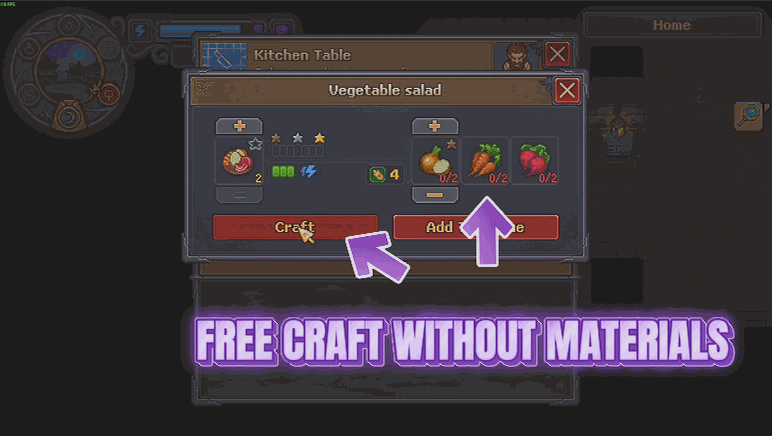
Recipes and buildings stop charging you for materials, and everything still comes out exactly as it always did. Craft and build what you want without the shopping trip first.
Flash of Genius
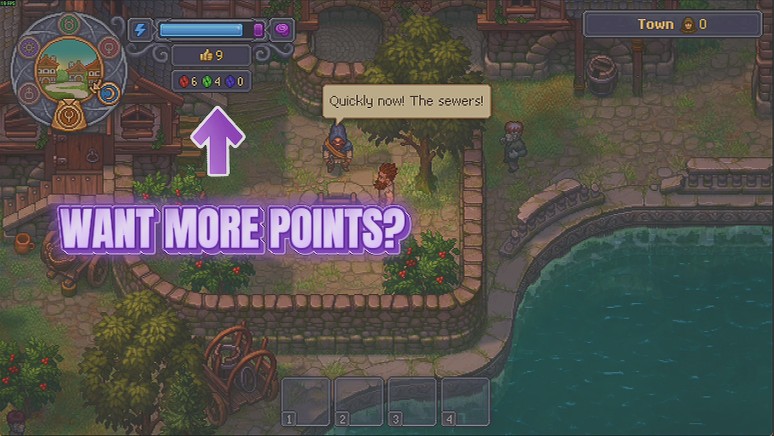
Hand yourself red, green and blue tech points on demand, one colour at a time or all three at once, so you can go straight to the part of the tech tree you actually care about.







