Want more mods for PlateUp!? Explore our entire collection!
Trophy Cabinet
"Every achievement on the shelf, no grinding required."
How do I install Trophy Cabinet?
Download the free ProjectMods desktop app, then install Trophy Cabinet for PlateUp! in one click.
</>What does Trophy Cabinet do?
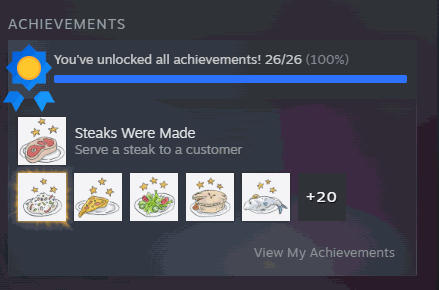
Some PlateUp! achievements ask for the kind of run most people never quite get - fifteen flawless days, a specific dish at a specific difficulty, a night without a single dropped plate. Trophy Cabinet fills the shelf for you. Refresh the list to see everything the game offers, then pick one to unlock or take the lot in a single press. They register properly in the in-game achievements screen and on your Steam profile at the same time, so the two never disagree. The mod checks the game's own records afterwards and tells you the real number you are holding, rather than just claiming success.
</>What is Trophy Cabinet?
Some PlateUp! achievements ask for the kind of run most people never quite get - fifteen flawless days, a specific dish at a specific difficulty. Trophy Cabinet fills the shelf: refresh the list, then pick one to unlock or take the lot in a single press. They land in the in-game achievements screen and on your Steam profile, and the mod checks afterwards so the count is real.
</>Common questions about Trophy Cabinet
What does Trophy Cabinet do in PlateUp!?
Trophy Cabinet unlocks PlateUp! achievements, either one at a time or all of them in a single press. Press Refresh List to load everything the game offers, then pick the one you want from the dropdown, or take the whole set with Unlock All Achievements. Either route registers them in the in-game achievements screen and on your Steam profile at the same time, so the two never disagree. It is aimed at the ones that need a very particular run to line up - the flawless fifteen days, the exact dish at the exact difficulty - rather than the ones you collect naturally while playing.
Why is the achievement list empty when I first load in?
The list starts empty until you ask for it, so an empty dropdown on your first load is normal rather than a fault. Press Refresh List once you are in the game and every PlateUp! achievement drops into the list ready to select. It is a one-press quirk rather than something broken, and it is the first thing to try if the list looks empty or shorter than you expected. Refreshing again is harmless, so if you have loaded a different save or you are not sure the list is current, press it once more and it fills straight back in with everything the game offers.
Do the achievements show up on my Steam profile as well as in-game?
Yes, both. Trophy Cabinet unlocks each achievement in the PlateUp! achievements screen and on your Steam profile at the same time, so you do not end up with an in-game shelf that Steam disagrees with. That matters because those two are what people actually look at - the screen you see while playing, and the profile your friends see. Anything you unlock is a normal Steam achievement afterwards; there is nothing to sync manually and nothing to press a second time. Steam needs to be running for the profile side, which it already will be if you started PlateUp! through ProjectMods.
Can I unlock a single achievement instead of all of them?
Yes, and it is the more interesting way to use it. Press Refresh List, choose the one you want from Select Achievement, then press Unlock Selected Achievement - only that one is granted. People generally use this to clear the two or three PlateUp! achievements that are genuinely unreasonable while leaving the rest to earn properly, which keeps the shelf meaningful. If you would rather have the whole set, Unlock All Achievements does the lot in one press. Both routes go through the same unlock, so a single achievement granted this way is identical to one from the full sweep.
How do I know the achievements actually registered?
Trophy Cabinet checks afterwards rather than just claiming success. Once an unlock is done it checks the game's own achievement records and reports the real number you are holding, so the count you see is what PlateUp! actually has on file rather than an optimistic total from the mod. If something did not take, the number tells you and you can press again. That is why you can trust the shelf: the figure in the panel and the figure in the achievements screen come from the same place, so there is never a moment where one says twelve and the other says nine.
What options does Trophy Cabinet include?
Refresh List
Press to load every achievement into the list below.
Select Achievement
Choose a single achievement to unlock.
Unlock All Achievements
Press to unlock every achievement in one go.
Unlock Selected Achievement
Press to unlock just the achievement you picked.
Trophy Cabinet, a PlateUp! mod from ProjectMods, unlocks achievements individually or all at once, registering them in the in-game screen and on your Steam profile at the same time.
System Requirements
What features does Trophy Cabinet include?
- Refresh once to load every achievement the game offers, then pick one or take the whole shelf
- Registers in the in-game achievements screen and on your Steam profile at the same time
- Checks the game's own records afterwards and tells you the real number you are holding
- Works one at a time, so you can fill in only the specific ones you never quite managed
Best For
- Completionists one achievement short of the set, stuck behind a fifteen-day flawless run
- Returning players whose Steam profile does not reflect the hours they have genuinely put in
- Chasing an achievement that needs a specific dish and a specific difficulty to line up perfectly
- Players who love the cooking but not the very particular run conditions some of these ask for
- Tidying up the last few after you have already beaten everything the game asks of you
More Mods for PlateUp!
/PlateUpGhostChef1.png)
Ghost Chef (Walk Through Anything)
Walk straight through counters, walls and other chefs instead of squeezing around them.
/PlateUpFullTill1.png)
Full Till (Instant Cash)
Top up your restaurant's money whenever you like, by however much you like.
/PlateUpMiseEnPlace1.png)
Mise En Place (Instant Prep)
Speed up chopping, cooking and every other timed job in the kitchen.



























































































































































































